Data Sources
Data sources are the heart of Yres; without sources the system moves no data.
In the Sources panel you connect and manage your source systems. For each source you define how Yres reaches it (type, integration runtime, credentials), which tables get loaded and how source data types are translated into the data warehouse. You don't draw pipelines visually here: you configure sources, tables and load types in wizards, and Yres then automatically generates the corresponding ADF pipelines.
For the exact connection requirements per source type (host, port, app registration, SAS token, OAuth …) see data source requirements. For the step-by-step flow of connecting one see connect a data source.
The complete list of screens with their route and fields is in Webapp screens.
The source catalog — /sources
The catalog is the panel's landing page: a single table with all your configured source systems for the active environment.
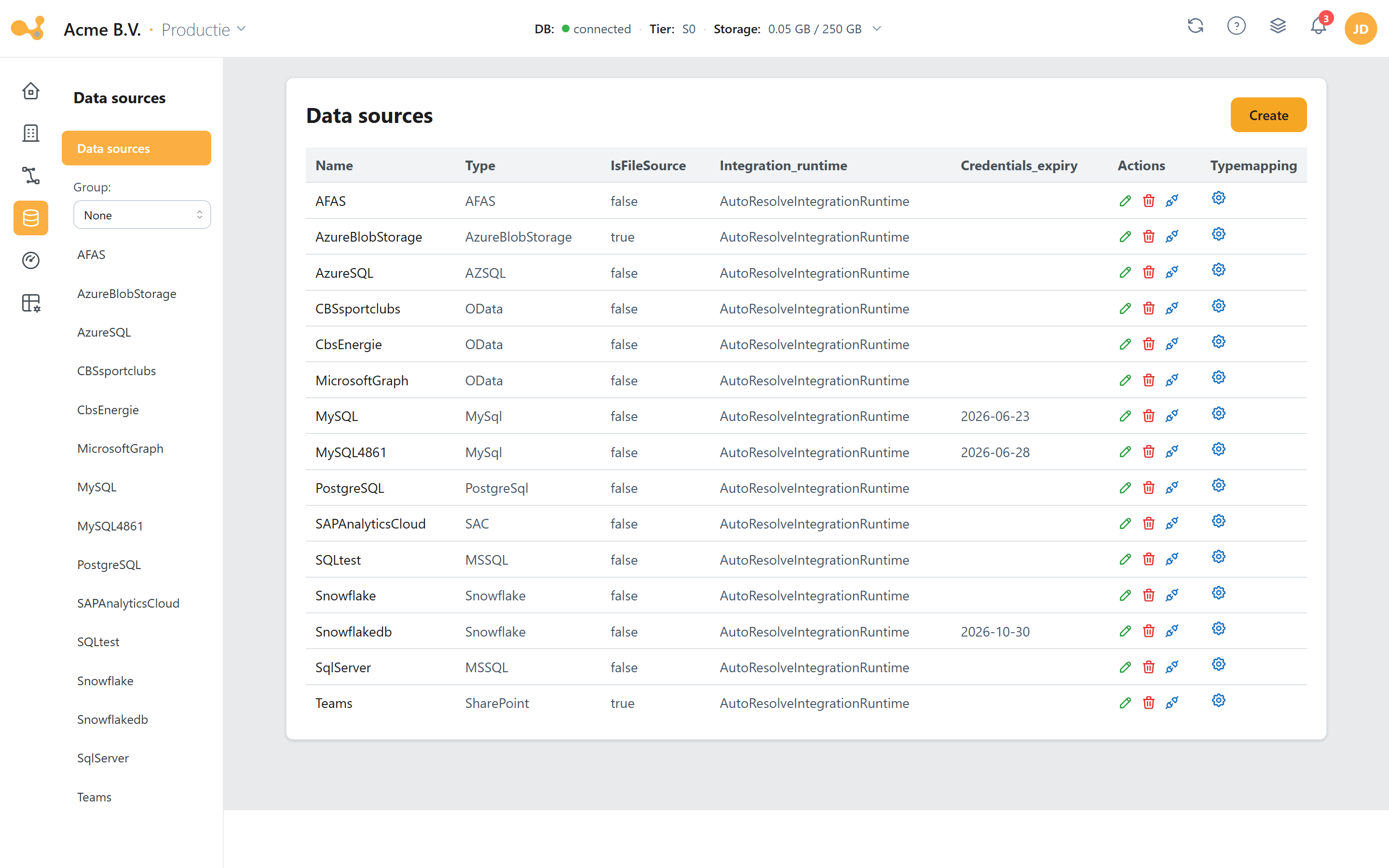
The source catalog shows one connected source per row. Key elements:
- Add source — opens the Create source wizard to connect a new source system.
- Source table — columns such as
Name,Type,Integration runtimeandCredential expiry. Inactive or not-yet-installed sources are shown greyed out. - Type mapping — a separate column/button per source. It appears only in the dev environment and links to the per-source type mapping (see below).
- Connectivity test — a blue plug icon per row. It appears only for installed sources that are not a
RestService, and runs a quick connection test. - Credential notifications — when you open the panel you get a notification if credentials have expired ("Credentials expired for …") or expire within a month ("Credentials almost expired for …"). Update the credentials through the source.
Grouping in the sidebar
Beneath the "Data sources" link in the left sidebar there is a sublink per source plus a Group combobox with three modes:
| Group mode | Effect |
|---|---|
| None | Flat list of all sources. |
| Data source type | Groups the sources under type headings (e.g. all OData sources together). |
| Data source tags | Groups under the tags you assigned per source. |
Connecting a source (Create source)
Every source is created through the Create source wizard. Yres asks for a number of fields for every source type ("form 1"); a type-specific subform follows after that (see data source requirements).
Shared fields (all sources)
| Field | Notes |
|---|---|
| Source name | Required, unique per organization, 2–45 characters, starts with a letter, alphanumeric. This name becomes the linked-service name in ADF as well as the Key Vault secret group adf-{name}-…. |
| Type | The source picker; determines which subform appears. |
| Integration runtime | Defaults to AutoResolveIntegrationRuntime; required. See below. |
| Credentials identical for all environments? | Yes reuses the dev credentials for prod. For ExactOnline this is forced to No (a separate app per environment). |
| Credentials expire? | Optional expiry date; it is attached to the password/secret in Key Vault and feeds the expiry notifications. |
| Tags | Optional, comma-separated (e.g. sales, salesforce). Use tags to group sources in the sidebar. |
The frontend stores no secrets. All credential fields go to the customer's Azure Key Vault (secret group adf-{sourceName}-…); the linked service only references them.
Integration runtime: cloud or self-hosted
The integration runtime (IR) determines from which machine ADF reaches the source.
AutoResolveIntegrationRuntime(cloud) — the default. Good for any cloud-reachable SaaS, HTTP, OData or REST source, and for Azure SQL, Snowflake, SharePoint, Salesforce, SAC, SAP_BDC and Power BI.- Self-hosted IR (e.g.
pwccIntegrationRuntimeLinked) — required for sources behind a firewall or on-premises: File Server, local files, and any on-prem/shielded database (MySQL, DB2, SQL Server, Oracle, PostgreSQL, SAP HANA via ODBC). Local files additionally require the-EnableLocalMachineAccessflag to be set once on the IR host.
Your own IRs that are published in ADF or via shared integration runtimes are detected automatically in the dropdown.
Source types
Yres supports 21 backend source types (DataSourceType.php): MSSQL, AZSQL, DB2, MySql, PostgreSql, AFAS, Oracle, OData, ODataoAuth, FileServer, SharePoint, ExactOnline, Snowflake, RestService, Monday, AzureBlobStorage, Salesforce, SAC, SAP_BDC, Onestream, PowerBI. MSSQL and AZSQL become the type MSSQL_ADF in the DWH.
In addition, the picker contains presets: source labels that internally resolve to a generic type with a fixed URL/auth, so you only fill in a domain or token. Examples: CBS, TweedeKamer, Topdesk, Graph, Dynamics_365 and Intune_DWH are stored as OData; Simplicate and BoardEPM as RestService.
What happens when you add one
On saving, Yres fills a number of SQL tables with basic source information and starts a chain of background tasks: CreateDataSourceInADF → SetDataSourceCredentials → CreateDataSourceInDataWarehouse. The first step adds the linked service plus the GetMetaData - <source> pipeline to the ADF factory. Publishing this to ADF is asynchronous: until it's done, the source's detail page shows the message "source not published". If a step fails, everything rolls back (the source is removed from both the DWH and ADF).
Refreshing metadata (Refresh metadata)
On the detail page of a database source there is a metadata pipeline card at the top with the latest run of GetMetaData - <source> (last run, status, link to ADF) and the buttons Refresh metadata and Load data (all).
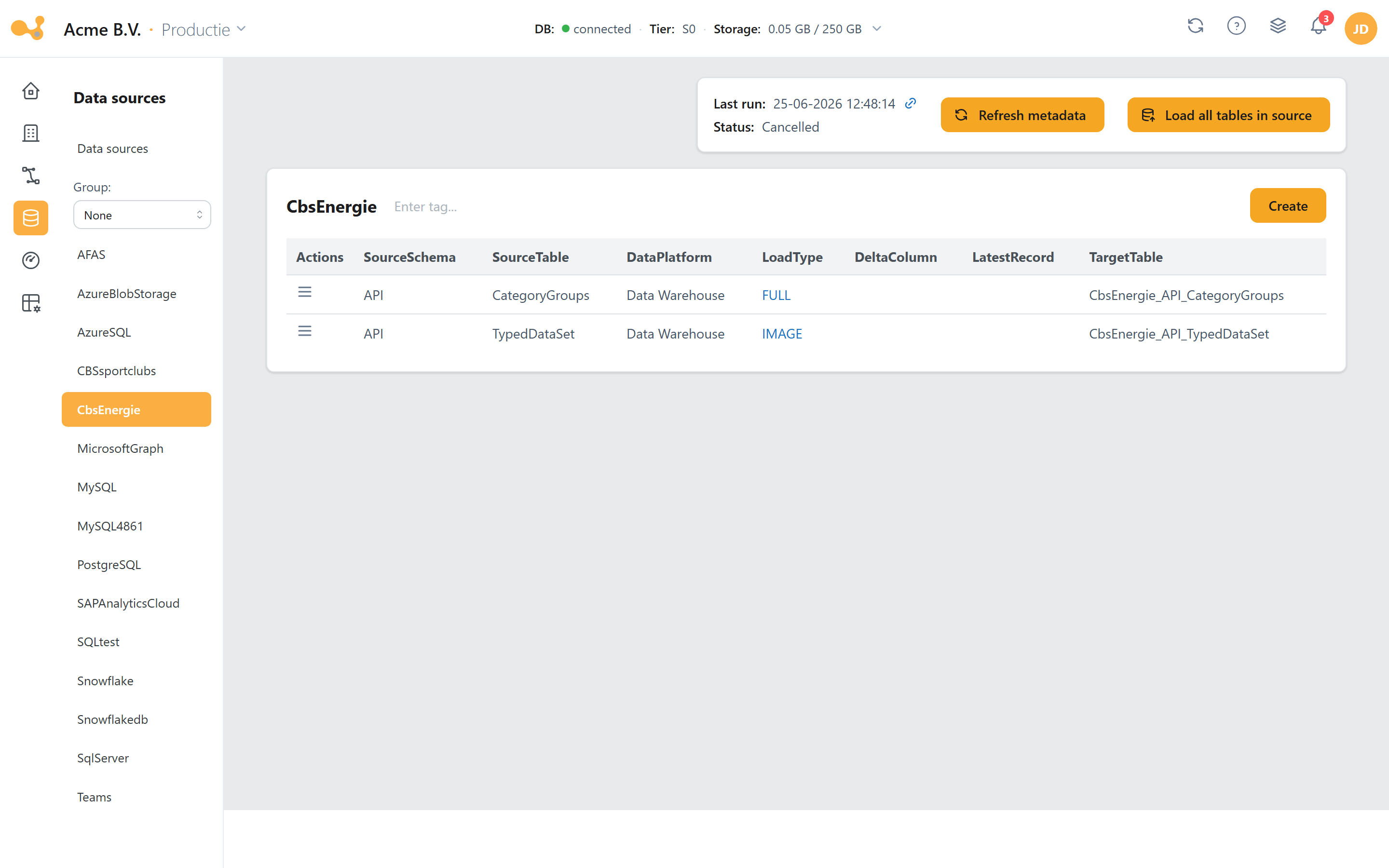
The Used overview page dispatches on source type: database sources show Used tables, file sources Used files and REST sources Used REST service.
Refresh metadata runs the GetMetaData pipeline. It reads schemas, tables and columns from the source and lands them in the dictionary (LoadManagement.Dictionary / LoadManagement.vwInitialDictionary). The wizard for adding tables reads that dictionary, so:
A metadata refresh must have run before you can add tables. Also refresh the metadata manually after creating a source, and again whenever the source schema changes.
Since the June 2026 hardening, a refresh first lands in a staging table and is only atomically swapped into the live dictionary after a successful, non-empty run. If a refresh fails or stops halfway, your existing columns simply stay in place. For sources that load per part (such as ExactOnline, AFAS and SAC), each successful part is updated immediately, even if another part fails. Technical detail: Stored procedures → Metadata staging.
Exception — file and REST sources skip this. For file sources (e.g. Azure Blob) and REST API services there is no dictionary; you manage the tables/files directly (for Azure Blob you even upload files directly).
Adding tables
After refreshing you add tables through the wizard. There you choose, per table, the columns, the load type and the key columns. Important: adding a table creates the physical STAGE/HIS tables and books a change — no data is loaded yet. You start the actual load via Load data or via a pipeline run.
Type mapping
Type mapping determines how a source data type is translated into a DWH data type (for the STAGE, HIS and Expose columns). There are two levels.
Per-source type mapping — /sources/:sourceId/typemapping
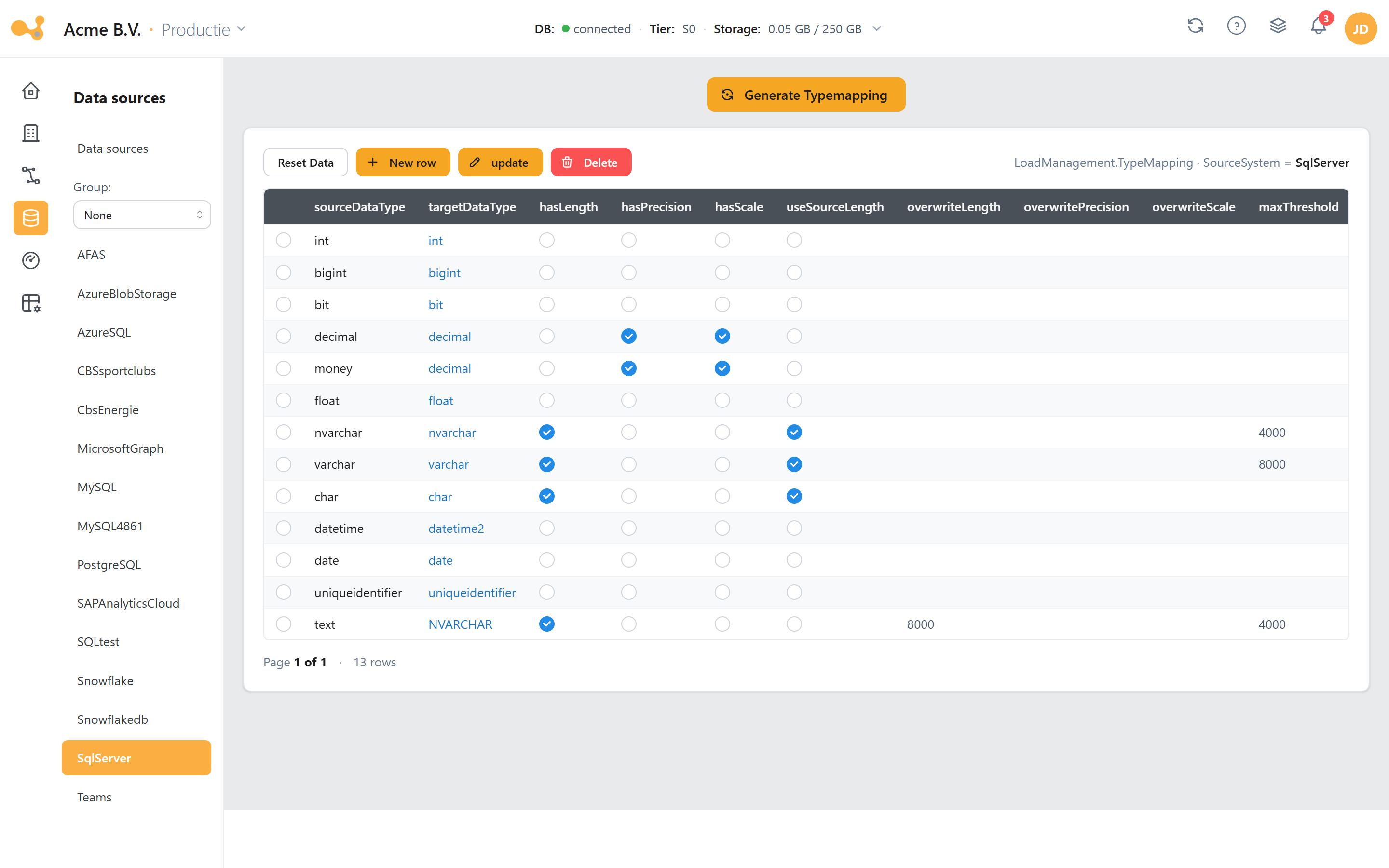
The per-source type mapping is an editable SQL grid on LoadManagement.TypeMapping, filtered on WHERE SourceSystem = '<source>' — only the rows of this source.
- Button Generate Typemapping — derives default mapping rules from the source schema (a monitored background task). The generation is additive: it only fills in missing type/column combinations and does not overwrite your own changes.
- Below the button an editable SQL grid; you can override rules manually or fall back to the global mapping.
The type-mapping tab/column appears only in the dev environment. Mappings are brought to other environments through the change process.
Global type mapping — /admin/globaltypemapping
The global type mapping is the organization-wide default that applies to all sources and environments, unless a per-source rule overrides it. Reachable via Admin (or the gear icon next to Sources).
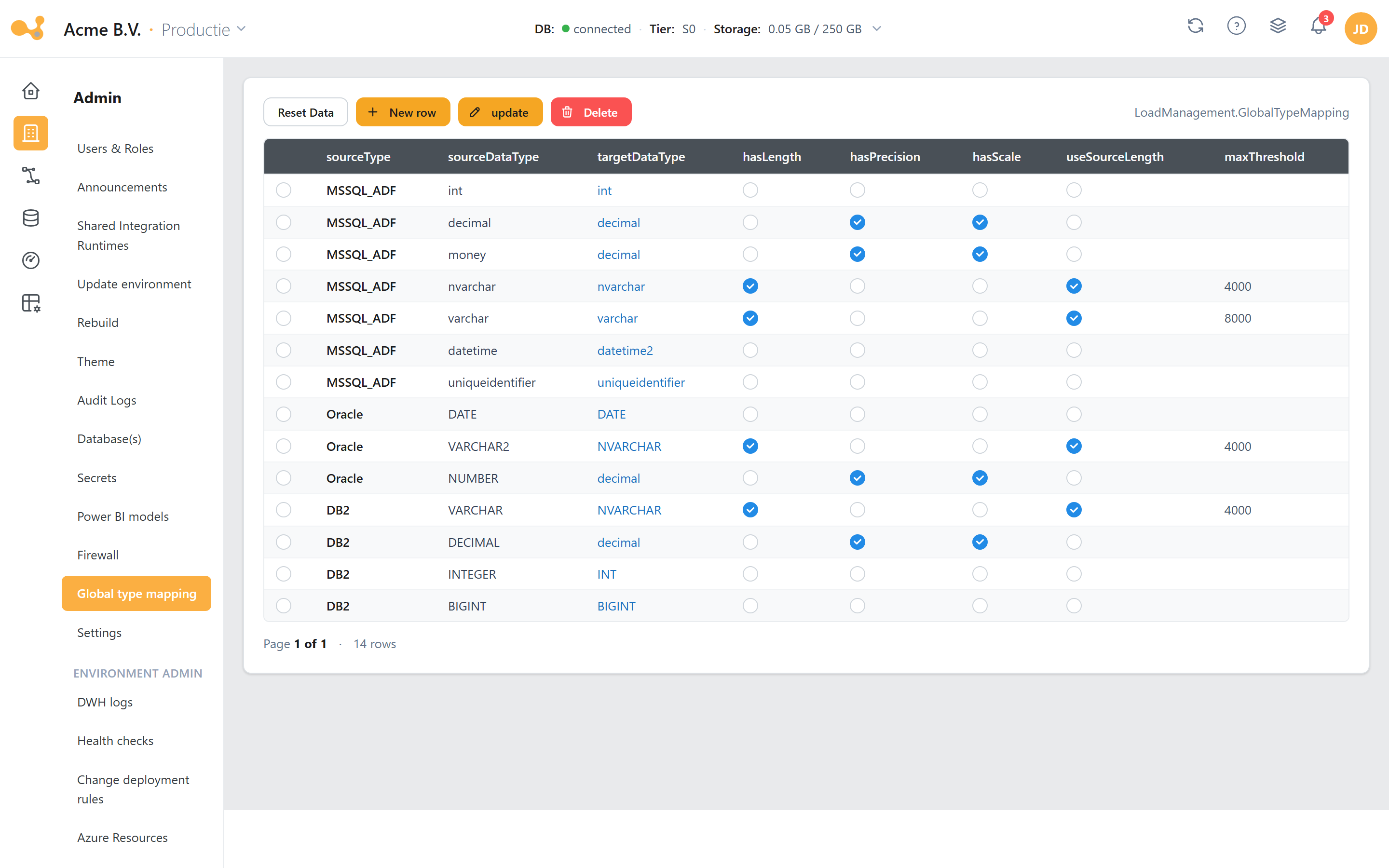
The global type mapping is the same kind of SQL grid, but on LoadManagement.GlobalTypeMapping and without a source filter. Use it to unify data types/properties that differ per source, so that views combining multiple source types work more smoothly.
Actions per source (depending on source type)
From a source's detail page a number of actions are available per used table. Which ones appear depends on the source type:
| Action | Available for | Purpose |
|---|---|---|
| Refresh metadata | all sources except file & RestService | Refreshes the dictionary (LoadManagement.Dictionary). |
| Compare metadata | all sources except file & RestService | Shows differences between the current source schema and the dictionary (appears when MetadataComparison deviates). |
| Column info | all sources except file & RestService | Shows the columns with their source and target data types (key columns with 🔑). |
| Load data / Load data (all) | all sources | Starts an ad-hoc load for one table or for all tables of the source. |
| Activate / deactivate | all sources (v≥1.54) | Determines whether the table is included in future loads. |
| Connectivity test | installed sources except RestService | Quick connection test from the catalog. |
In the dev environment the page blocks editing tables if there is no open change; you then get a link to Projects/Changes. Create a change first.