Data source requirements
This page is the complete connection matrix for every data source Yres supports: which fields you fill in, which authentication method applies, which integration runtime (IR) is needed and which preparation (app registration, secret, SAS token, redirect URL) you arrange in advance.
Looking for the step-by-step procedure or the source-specific details? See the source pages per type and the how-to Connect a data source. This page stays in sync with them.
- The source name is unique per organization, starts with a letter, is alphanumeric and 2–45 characters long. The
name becomes the name of the ADF linked service and the Key Vault secret group
adf-{bronnaam}-…. - Yres never stores secrets in the frontend. All credentials go to the customer's Azure Key Vault; the linked service only references them.
- The IR defaults to
AutoResolveIntegrationRuntime(cloud). For on-premises or shielded sources you choose a self-hosted IR (pwccIntegrationRuntimeLinked).
The "Create source" wizard
You create every source through the same wizard. Step 1 ("Source") asks for fields that apply to all source types; step 2 ("Credentials") asks for the source-specific connection details, per environment.
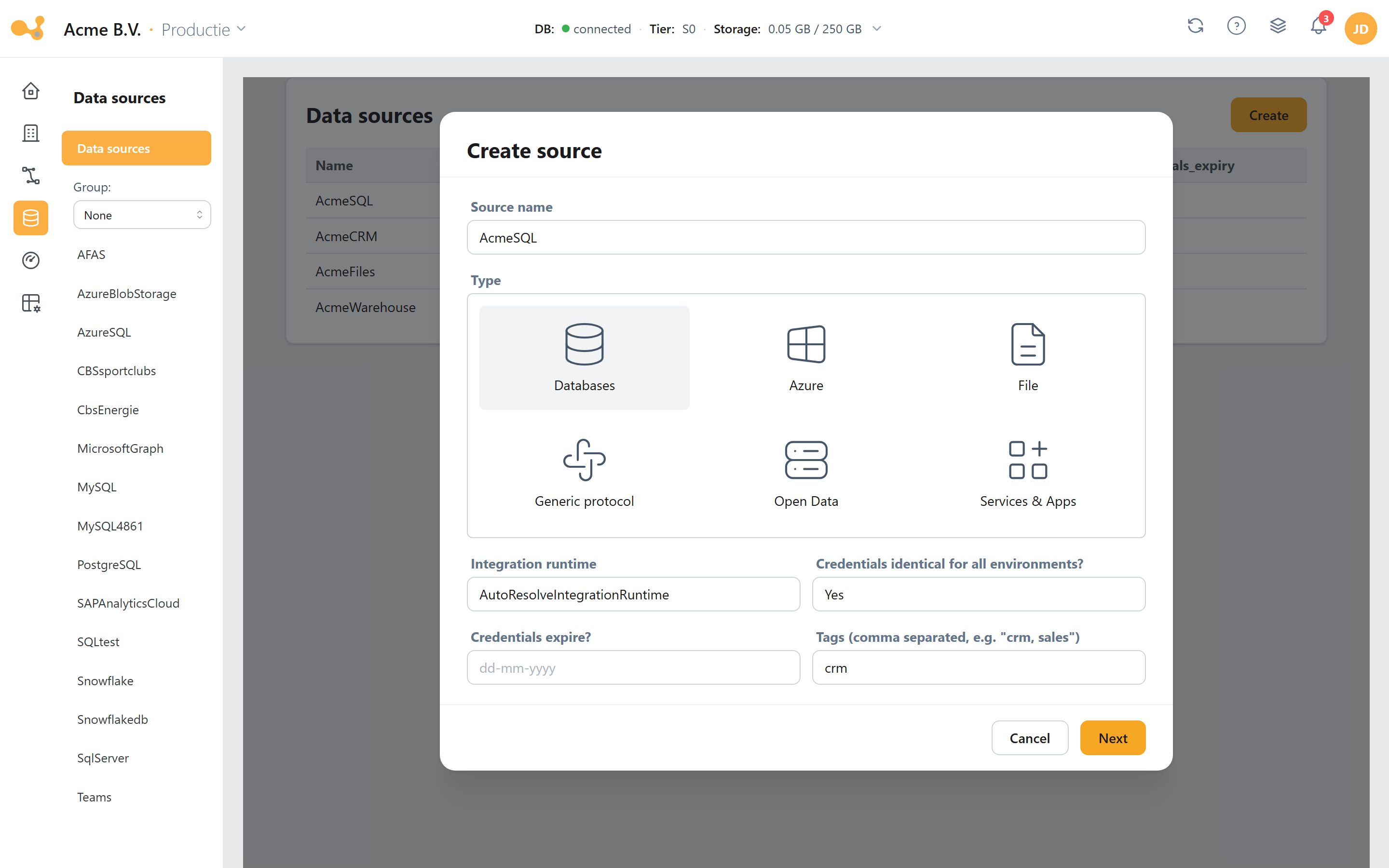
Step 1 of the "Create source" wizard: you first define the source, then enter the credentials per environment.
- Source name — alphanumeric, starts with a letter, unique per organization (e.g.
SQL_CRM). Becomes the name of the linked service and the Key Vault secret group. - type — the categorized source picker (Databases: SQL Server / Azure SQL / Oracle / DB2; apps: AFAS, ExactOnline, Monday …). The choice determines which subform appears.
- integration runtime — defaults to
AutoResolveIntegrationRuntime; also shows all published self-hosted runtimes. - Credentials identical for all environments? — "Yes" lets you enter the credentials once; "No" adds a separate step per environment. (Forced to "No" for Exact Online.)
- Step 2 (Credentials) — the source-specific fields (e.g. host / database name / port / user name / password) per environment.
- Next — proceeds to the credentials; the final step sends
POST /data-source.
In addition, step 1 also asks for credentials expire? (an optional expiry date that travels with the Key Vault secret) and Tags (optional, comma-separated).
Databases (direct connection)
All database sources are on-prem capable: IR = AutoResolveIntegrationRuntime if the database
is reachable from the cloud, otherwise a self-hosted IR. Authentication is always
username/password, stored in Key Vault.
| Source | Requirements | Auth | IR |
|---|---|---|---|
| MySQL | Host · Port · Database name · Username · Password | Basic | AutoResolve / self-hosted |
| DB2 | Host · Port · Database name · Username · Password | Basic | AutoResolve / self-hosted |
| SQL Server | Host · Port · Database name · Username · Password | Basic | AutoResolve / self-hosted |
| Azure SQL Database | Host · Port · Database name · Username · Password | Basic | Cloud (AutoResolve) |
| Oracle | Host · Port · Service name · Username · Password | Basic | AutoResolve / self-hosted |
| PostgreSQL | Host · Port · Database name · Username · Password | Basic | AutoResolve / self-hosted |
| Snowflake | Account name · Username · Password · Database · Warehouse · Role (optional) | Basic | Cloud (AutoResolve) |
Oracle is the only database that asks for a Service name instead of a database name. SQL
Server and Azure SQL are stored internally as DWH source type MSSQL_ADF.
Two delta columns (comma-separated, same data type — the highest value counts) work on every source Yres
queries with SQL: SQL Server, Azure SQL Database, MySQL, PostgreSQL, Oracle, DB2, Sybase, Snowflake and
OneStream. The engine builds an ANSI COALESCE expression, so MySQL is no longer an exception. See
Load types → Multiple delta columns and MySQL.
SAP HANA / SAP S/4HANA
SAP HANA and S/4HANA have no dedicated form. You reach them through a generic method:
- Direct ODBC/database connection — use the generic DB form (host + SQL port
3<instance>15, DB user + password), or - OData service — HANA via
….xsodata; S/4HANA via…/sap/opu/odata/<namespace>/<service>(activate the service in the SAP Gateway with/IWFND/MAINT_SERVICE), with Basic auth or OAuth.
For the Business Data Cloud route, see SAP_BDC below. See also SAP HANA and SAP S/4HANA.
Azure / Microsoft platform
Azure Blob Storage
Requires a SAS token (create it via the storage account → Security + Networking → Shared Access
Signature). The wizard builds the SAS URL itself: https://{account}.blob.core.windows.net/{container}?{sasToken}.
- Fields: Account name · Container name · SAS token
- Auth: SAS token · IR: configurable (cloud or self-hosted)
Azure Data Lake (Gen2)
The Data Lake (AzureBlobFS, SAS authentication) is primarily Yres' own staging/output layer, not
by default a user-added source. When it is used as a source, it follows the same
SAS pattern as Azure Blob Storage / SAP_BDC.
Azure Data Lake has no choice of its own in the source picker (SourceField.tsx). To ingest data from
it, connect the Data Lake as an Azure Blob Storage source (same AzureBlobFS/SAS form). In addition, a
Data Lake serves as internal Yres staging/output storage.
SharePoint
Register an app in Azure AD in advance, create a client secret, store App ID + secret in the Azure Key
Vault (in your resource group) and add the app to the SharePoint site/Teams team via
.../_layouts/15/appinv.aspx with this permission:
<AppPermissionRequests AllowAppOnlyPolicy="true">
  <AppPermissionRequest Scope="http://sharepoint/content/sitecollection/web" Right="FullControl" />
</AppPermissionRequests>
- Fields: SharePoint site URL · AD tenant name · Postfix (
sites/teams/personal/empty) · AD tenant ID · Application ID / Service principal ID · Application secret / Service principal key - Auth: Azure AD app-only (service principal); the linked service itself is created as
HttpServer+ Anonymous, while the actual authentication runs through the stored clientId/secret/tenant.
Microsoft Teams
Teams has no dedicated form; you access it via Microsoft Graph (see below). You need an
Entra ID (Azure AD) app registration: Client ID, Tenant ID, Client secret and Graph permissions (e.g.
Channel.ReadBasic.All, ChannelMessage.Read.All) with admin consent. See Teams.
Microsoft Graph
| Field | Notes |
|---|---|
| URL | Fixed: https://graph.microsoft.com/v1.0 |
| Token URL | Fixed (tenant-built): https://login.microsoftonline.com/{tenant}/oauth2/v2.0/token |
| Tenant ID · Client ID · Client Secret · Scope | From the Entra ID app registration |
| Grant Type | Client Credentials or Authorization Code (the latter adds a Refresh token) |
- Auth: OAuth2 (client credentials or authorization code). In advance: Entra ID app registration, client secret (shown once), Graph API permissions + admin consent. See Microsoft Graph.
Dynamics 365 (Business Central / Dataverse)
| Field | Notes |
|---|---|
| URL | Fixed: Business Central OData V4 (tenant + company built in) |
| Access token URL | Fixed: https://login.microsoftonline.com/{tenant}/oauth2/v2.0/token |
| Tenant ID · Company name · Client ID · Client secret · Scope | From the Entra ID app registration |
| Grant Type | Client Credentials or Authorization Code (+ Refresh token) |
- Auth: OAuth2 service principal. In advance: environment URL
https://<org>.crm4.dynamics.com; Entra ID app registration with Dynamics CRM/Dataverseuser_impersonation, client secret. See Dynamics 365.
Intune Data Warehouse
- Fields: URL is fixed
(
https://fef.{tenant}.manage.microsoft.com/ReportingService/DataWarehouseFEService?api-version=v1.0) · OAuth2 fields identical to Graph/D365 (Tenant ID · Client ID · Client Secret · Scope · Grant Type). - Auth: OAuth2. There is (as yet) no separate source page for Intune DWH; it works as an OData preset.
Power BI
- Fields: Tenant ID · Client ID · Client secret
- Auth: Azure AD app (service principal). Power BI is a file source without metadata: no linked service or dataset is created; Yres only writes three Key Vault secrets and consumes via the Power BI API (not via an ADF copy). Intended for unified models / dashboards. See Power BI.
SAP family & Datasphere
SAC (SAP Analytics Cloud)
- Fields: URL · Authentication URL · Client ID · Client secret
- Auth: OAuth2 client credentials (set up an OAuth client in SAC). Runs on the cloud IR. See SAC.
Onestream (preview)
- Fields: URL · Application · AuthenticationType (
OAUTH2orPAT).OAUTH2→ Client ID · Client secret · Access token URLPAT→ Personal access token
- Auth: OAuth2 client credentials or Personal Access Token. (preview — may be unstable.) See Onestream.
SAP Business Data Cloud (SAP_BDC)
- Fields: Sas uri (
https://<host>/, with trailing slash, hostname only) · container · Sas token (must containsig, sp, se, spr, st, without a leading?) - Auth: SAS token (the source exposes an Azure Data Lake / Blob FS endpoint). Runs on the cloud IR.
SAP Datasphere
SAP Datasphere has no dedicated form. The template is an AzureBlobFS with SAS URI — the same
shape as SAP_BDC. Datasphere is therefore consumed as an AzureBlobFS/SAS source. See
SAP Datasphere.
SAP_BDC ("SAP Business Data Cloud") and SAP Datasphere are related but different SAP products. Datasphere has no picker entry of its own; you connect it through the SAP_BDC form.
Business apps / SaaS
| Source | Requirements | Auth | Setup |
|---|---|---|---|
| Monday | URL · API token | API token as Authorization header | Create an API token (Monday docs) |
| AFAS | URL (https://….afas.online/profitrestservices) · API token | API token as Authorization header | Via the AFAS app connector |
| Exact Online | Client ID · Client secret · (interactive OAuth login) | OAuth2 authorization code (per environment) | Exact apps for dev and prod; set the redirect URL according to the webapp |
| Simplicate | Domain name · Authentication key · Authentication secret | Two custom HTTP headers (key + secret) | API key + secret in Simplicate |
| Salesforce | Environment URL · Client ID · Client secret | OAuth2 client credential | Consumer ID/secret from the App Manager |
| Topdesk | Domain · Username · Password | Basic | Create an application password in Topdesk |
| BoardEPM | Server · Application · Identity provider | OAuth2 client credential | Set up an OAuth client in Board |
For Exact Online, "Credentials identical for all environments?" is forced to "No": you create a
separate Exact app per environment and set the redirect URL per environment
({BACKEND_URL}/exactonline/callback). See Exact Online.
Yres connects to Topdesk via the OData reporting endpoint
https://{domain}.topdesk.net/services/reporting/v2/odata (stored as source type OData, Basic auth,
pagination BodyUrl) — not via the REST API /tas/api. The application password remains the
Basic credential. See Topdesk.
Mendix
Mendix has no dedicated form. Connect via REST/OData: publish an OData service in Studio
Pro and use the generic OData or RestService form with the service URL
https://<app-host>/<location>/ and Basic/API-key credentials. See Mendix.
Generic protocols
OData
- Fields: URL · Pagination type (
BodyUrl) · Body URL ($['@odata.nextLink']) · AuthenticationType (Anonymous/Basic; Basic adds Username + Password) · optional extra HTTP headers (Authorization,APIKey,X-API-KEY). - Auth: Anonymous or Basic. The webapp appends a trailing
/to the OData URL. See OData.
OData OAuth
- Fields: URL · Body URL (
$['@odata.nextLink']) · Client ID · Client secret · Access token URL · Scope · Grant Type (Client Credentials/Authorization Code; the latter requires a Refresh token). - Auth: OAuth2 (client credentials or authorization code). See OData OAuth.
RestService
- Fields: OpenAPI specification URL (optional) · Base URL (required, does not end in
/) · paginationType (No pagination/RFC5988/BodyUrl/Offset/Paging/OffsetPage; each type adds its own fields) · AuthenticationType (Anonymous/Basic/OAuth2ClientCredential) · optional extra HTTP headers.Basic→ Username + PasswordOAuth2ClientCredential→ Token endpoint + Client ID + Client Secret + Scope + Resource
- Auth: Anonymous, Basic or OAuth2 client credential. See RestService.
REST sources support OpenAPI 3.x: with a valid openapi.json/swagger.json you select the endpoints
in the frontend instead of typing them in by hand.
CBS (helper, OData)
- Fields: only Dataset (the URL is fixed:
https://opendata.cbs.nl/ODataFeed/odata/+ dataset). - Auth: Anonymous — no credentials needed. See CBS.
Tweede Kamer (helper, OData)
- Fields: none (fixed URL
https://gegevensmagazijn.tweedekamer.nl/OData/v4/2.0/). - Auth: Anonymous — no credentials needed. See Tweede Kamer.
File sources
File Server
- Fields: Host / file path on the integration runtime (e.g.
\\SERVERNAME\SharedFolder) · Username · Password - Auth: Windows user/password. IR: self-hosted required (reads from a UNC/file path). See File Server.
Local files (CSV/Excel)
- No credentials. Files are uploaded directly or read via a self-hosted IR on the machine holding
the files. Is the IR running under a service account? Then run once on the IR host:
.\dmgcmd.exe -EnableLocalMachineAccess. IR: self-hosted required. See Local files and troubleshooting.
Authentication & IR overview (cheat sheet)
A quick look at which authentication method and which integration runtime go with each source.
By authentication method
| Authentication | Sources |
|---|---|
| Username + password (Basic, in Key Vault) | MySQL, DB2, SQL Server, Azure SQL, Oracle, PostgreSQL, Snowflake, OData (Basic), RestService (Basic), Topdesk, File Server, Mendix (option) |
| SAS token | Azure Blob Storage, SAP_BDC, SAP Datasphere, Azure Data Lake |
| API token as HTTP header | AFAS, Monday, Simplicate (key + secret) |
| OAuth2 client credentials | SAC, Salesforce, OData OAuth (Client Credentials), RestService (OAuth2ClientCredential), BoardEPM, Onestream (OAUTH2), Graph/Dynamics 365/Intune (Client Credentials) |
| OAuth2 authorization code (+ refresh token) | Exact Online, OData OAuth (Authorization Code), Graph/Dynamics 365/Intune (Authorization Code) |
| Azure AD service principal (app registration) | SharePoint, Power BI, Teams/Graph, Dynamics 365 |
| Personal access token | Onestream (PAT) |
| Anonymous (public) | CBS, Tweede Kamer |
By integration runtime
| IR requirement | Sources |
|---|---|
| Self-hosted IR required | File Server, Local files, plus any on-prem/shielded DB (MySQL, DB2, SQL Server, Oracle, PostgreSQL, SAP HANA ODBC) |
| Cloud (AutoResolve) typical, self-hosted optional | Azure SQL, Snowflake, all SaaS/OData/REST sources, SharePoint, Salesforce, SAC, SAP_BDC, Power BI |
All PostgreSQL connections run through the on-prem-capable PostgreSql type. The separate
AzurePostgreSql variant is disabled in the code and is not used.