Load types
A load type determines what happens to the existing data in the history table (HIS) when a load runs. You set it per table via the Add table wizard and can override it per run (an alternative load).
Yres has seven load types. They are recorded per table in LoadManagement.UsedTables.LoadType and executed by the SCD2 merge procedure [LoadManagement].[spHIS_InsertAndUpdate] (called via [LoadManagement].[spLoadDWH]). This page is the single canonical source for load types; other pages (such as Connecting & loading a data source) link here.
With Yres, a load almost never means that old data is lost. Six of the seven load types preserve history (SCD2). Only OVERWRITE discards history. Read on to find out why — this is often misunderstood.
The seven load types at a glance
In the table below:
- "match" = the row already exists in HIS (same key) and is the current version (
KeyHashequal andIsCurrent = 1). - "changed" = a match where the
RowHashdiffers (a tracked column has changed). - "close out" = the existing row remains as history but is set to non-current (
IsCurrent = 0,ETL_EndDategets the close-out moment). The data is retained. - "missing" = a key that is in HIS but not in the supplied batch (STAGE).
| Load type | What it does | History? | Keys missing from the batch | Watermark? |
|---|---|---|---|---|
| FULL | Upsert: insert new rows, version changed rows (close out the old version), leave the rest untouched. | Yes (SCD2) | Stay current (not closed out) | no |
| DELTA | Like FULL, but only for supplied (changed) records; deduplicate in-batch on MAX(deltaColumn) per key. | Yes | Stay current | yes (MAX(DeltaColumn)) |
| DELTAIMAGE | DELTA plus closing out missing keys within the delta window (>= watermark). | Yes | Closed out if they fall within the window | yes |
| IMAGE | Full snapshot: upsert plus close out all missing keys (soft-delete). | Yes | All closed out | no |
| OVERWRITE | HIS is truncated and all STAGE rows are re-inserted. | No — history gone (truncate, RowId restarts) | Gone | no |
| RELOAD | Close out all current rows (history is retained; the close-out also re-stamps rows that were already closed — see below) and then insert all STAGE rows. | Yes (old generation closed out) | Closed out | no |
| ADDITIONAL | Pure append — no key match, no deduplication; duplicates are allowed. | Yes (append only) | Stay current | yes |
This is the most common mistake. OVERWRITE = no history (the HIS table is emptied and the surrogate key RowId restarts). RELOAD = preserve history (the old generation of rows is closed out, not deleted). This page follows the actual engine code and the regression tests in DWH/tests/spRunLoadEngineTests.sql.
What each type does exactly
FULL — history-aware upsert
FULL is the default, history-preserving SCD2 upsert. Per key:
- New (key not yet in HIS) → insert with
Delta = 'N',IsCurrent = 1. - Changed (key exists,
RowHashdiffers) → insert a new version (Delta = 'D',IsCurrent = 1) and close out the old version (IsCurrent = 0,ETL_EndDate= newETL_Date). - Unchanged → do nothing.
- Missing (key is in HIS but not in the batch) → stays current; FULL does not close out missing keys.
Use FULL for tables that you always supply in full but where vanished rows should not count as deleted.
DELTA — changes only, with watermark
DELTA works like FULL, but you supply only the changed records (based on a change column, the DeltaColumn). Before the merge runs, the engine deduplicates the batch on MAX(deltaColumn) per key (the most recent in-batch version wins). Afterwards the watermark advances: LoadManagement.UsedTables.LatestRecord is set to MAX(DeltaColumn), so the next run continues from there. Missing keys stay current.
The watermark only advances when the load completed in full. If (part of) the load fails, LatestRecord stays put — visible in monitoring as "Delta watermark not advanced" — and the next successful run automatically picks up the difference again. No manual recovery is needed after a failed delta load.
Use DELTA for large tables with a reliable, increasing change column.
DELTAIMAGE — DELTA that catches deletions within the window
DELTAIMAGE is DELTA plus closing out missing keys, but only within the delta window (deltaColumn >= the watermark, determined via fxGetDeltaValue). Rows older than the window remain untouched. This lets you catch deletions without rescanning the entire table.
Use DELTAIMAGE when you load incrementally and want to detect deletions within the recent window.
IMAGE — full snapshot with soft-delete
IMAGE expects the complete dataset per run. It does an upsert (new/changed like FULL) and then closes out all missing keys. That is a soft-delete: the row remains as history at IsCurrent = 0.
Use IMAGE when the source always delivers the full state and deletions must become visible.
OVERWRITE — replace without history
OVERWRITE first truncates the HIS table (via spHIS_TruncateTable) and then inserts all STAGE rows as new. All previous history is gone and the IDENTITY surrogate RowId restarts at 1.
Use OVERWRITE only for tables where you genuinely don't need to keep history (for example a lookup or dimension table that you want to fully reset).
RELOAD — replace with history
RELOAD first closes out all current rows (IsCurrent = 0, ETL_EndDate set) and then inserts the full STAGE set as a new generation. The old generation remains as history. The difference with OVERWRITE: RELOAD discards nothing. One nuance: the close-out is an UPDATE without a WHERE — rows that were already closed also get a new ETL_EndDate, overwriting their original close moment. No rows disappear, but keep this in mind if you reconstruct history from ETL_EndDate.
Use RELOAD when you want to reload the full set but keep the previous state as history.
ADDITIONAL — pure append
ADDITIONAL adds every STAGE row without key match and without deduplication. Loading the same batch twice produces duplicates (multiple IsCurrent = 1 rows per key are allowed). The watermark does advance.
Use ADDITIONAL for append-only sources such as logs or events.
Which load type when?
- FULL — you supply the full table, but vanished rows may continue to exist; you want history of changes.
- DELTA — large tables with a reliable change column; process only changes.
- DELTAIMAGE — like DELTA, but you also want to catch deletions within the recent window.
- IMAGE — the source always delivers the full state and deletions must become visible.
- OVERWRITE — small, fully resettable tables for which you don't need history.
- RELOAD — reload the full set but keep the previous state as history.
- ADDITIONAL — append-only sources (logs, events).
The engine supports all seven types. In the webapp, overriding the load type per run only offers FULL, IMAGE, OVERWRITE and RELOAD — that is a UI limitation, not a limitation of the engine.
Multiple delta columns
For incremental loads (DELTA, DELTAIMAGE and ADDITIONAL) a single change column is usually enough. Sometimes, though, a source records "last changed" across two columns — for example a CreatedDate that is only set on insert alongside a ModifiedDate that is only set on change, or two separate audit-timestamp columns. With a single delta column you would then miss the records whose change lands only in the other column. That is why Yres lets you specify a second delta column.
You set this in step 4 (Load type) of the Add table wizard. Next to the Delta column field, an Additional delta column field appears. That second field:
- only lists columns with the same data type as the first delta column (and only columns you ticked in the Columns step);
- is optional — pick No addition delta column to skip it;
- is disabled when no column of the same data type is available (then you can pick only one delta column).
The webapp stores both columns together, comma-separated with the first column first, in LoadManagement.UsedTables.DeltaColumn (for example ModifiedDate, CreatedDate).
How the engine combines two columns
When building the source filter, the engine (LoadManagement.fxExtractor) uses not one column but the greater of the two — a NULL-safe "greatest":
WHERE
  CASE WHEN COALESCE(col1, col2) >= COALESCE(col2, col1)
       THEN COALESCE(col1, col2)
       ELSE COALESCE(col2, col1)
  END >= <watermark>
The consequences:
- A row falls within the delta as soon as either column has moved past the watermark. If only
CreatedDateor onlyModifiedDatechanges, the row is still picked up. - The comparison is NULL-safe: if one of the two columns is
NULL, the other counts. Only when both areNULLdoes the row fall outside the delta. - The watermark (
LoadManagement.UsedTables.LatestRecord) then advances with the highest observed delta value, just as with a single delta column, so the next run continues from there.
Conditions
- At most two delta columns.
- Both columns must have the same data type — for Additional delta column the webapp only shows columns of the same type as the first.
- Two delta columns work on every source Yres queries with SQL: SQL Server, Azure SQL Database, MySQL, PostgreSQL, Oracle, DB2, Sybase, Snowflake and OneStream. The engine builds an ANSI
COALESCEexpression, so this includes MySQL. See Data source requirements.
A table Orders stamps CreatedDate on creation and ModifiedDate on every later change. A new order does get a CreatedDate but (not yet) a ModifiedDate; an updated order gets a new ModifiedDate. With both columns as delta column the load picks up new and changed orders in one pass — a filter on ModifiedDate alone would miss the new, not-yet-changed orders.
The delta window for file sources
For file sources (Azure Blob Storage, File Server) there is no change column inside the data. There, Yres looks at the file's modification date and only picks up files that fall within a look-back window. You set that window per table with two fields in the wizard's Options step:
- Delta overlap — a number.
- Delta overlap unit — the unit that goes with it.
Together they mean "look back this far from now". With 7 + DAY the load picks up every file modified
in the past seven days. Permitted units:
| Unit | Also accepted | Length |
|---|---|---|
SECOND | SECONDS | 1 second |
MINUTE | MINUTES | 60 seconds |
HOUR | HOURS | 1 hour |
DAY | DAYS | 24 hours |
WEEK | WEEKS | 7 days |
MONTH | MONTHS | 30 days (fixed) |
YEAR | YEARS | 365 days |
Capitalisation does not matter: DAY, Day and day all work.
Enter something outside the table (QUARTER, say, or a typo) and the load counts in seconds — with
no error. A window meant to be "7 quarters" then becomes 7 seconds and the load picks up next to nothing.
Leave the fields empty or set the overlap to 0 and the opposite applies: no window is enforced and
every file qualifies.
Since v1.56, plural forms such as DAYS are recognised and YEAR counts 365 days. Environments
with a configuration from before v1.55 will pick up a wider window after the update.
How Yres detects changes (hashing)
Yres determines "new / changed / unchanged" not column by column, but with two SHA2_512 hashes computed as persisted computed columns on the STAGE table:
KeyHash(varbinary(66)) — a hash over the key columns. Determines which row in HIS belongs to a STAGE row. The merge joins onSTAGE.KeyHash = HIS.KeyHash AND HIS.IsCurrent = 1.RowHash(varbinary(66)) — a hash over the tracked columns (the columns withRowhash = 1). Determines whether a row has changed: a change isSTAGE.RowHash <> HIS.RowHash.
A column with Rowhash = 0 does not count toward change detection: if only that column changes, the engine sees the row as unchanged. This keeps technical or non-relevant fields out of SCD2 versioning.
Besides the business columns, each HIS row gets framework columns: <table>_RowId (IDENTITY surrogate), ETL_Date (load moment), ETL_EndDate (sentinel '2999-01-01 00:00:00' while the row is current), KeyHash, RowHash, Delta ('N' = new, 'D' = changed) and IsCurrent (1/0). The full SCD2 behavior is described in History & SCD2.
The Add table wizard
You configure the load type and key columns in the multi-step Add table wizard, reachable via Data sources › (source) › Used tables. The image below shows step 3 (Columns); load type and key follow in steps 4 and 5.
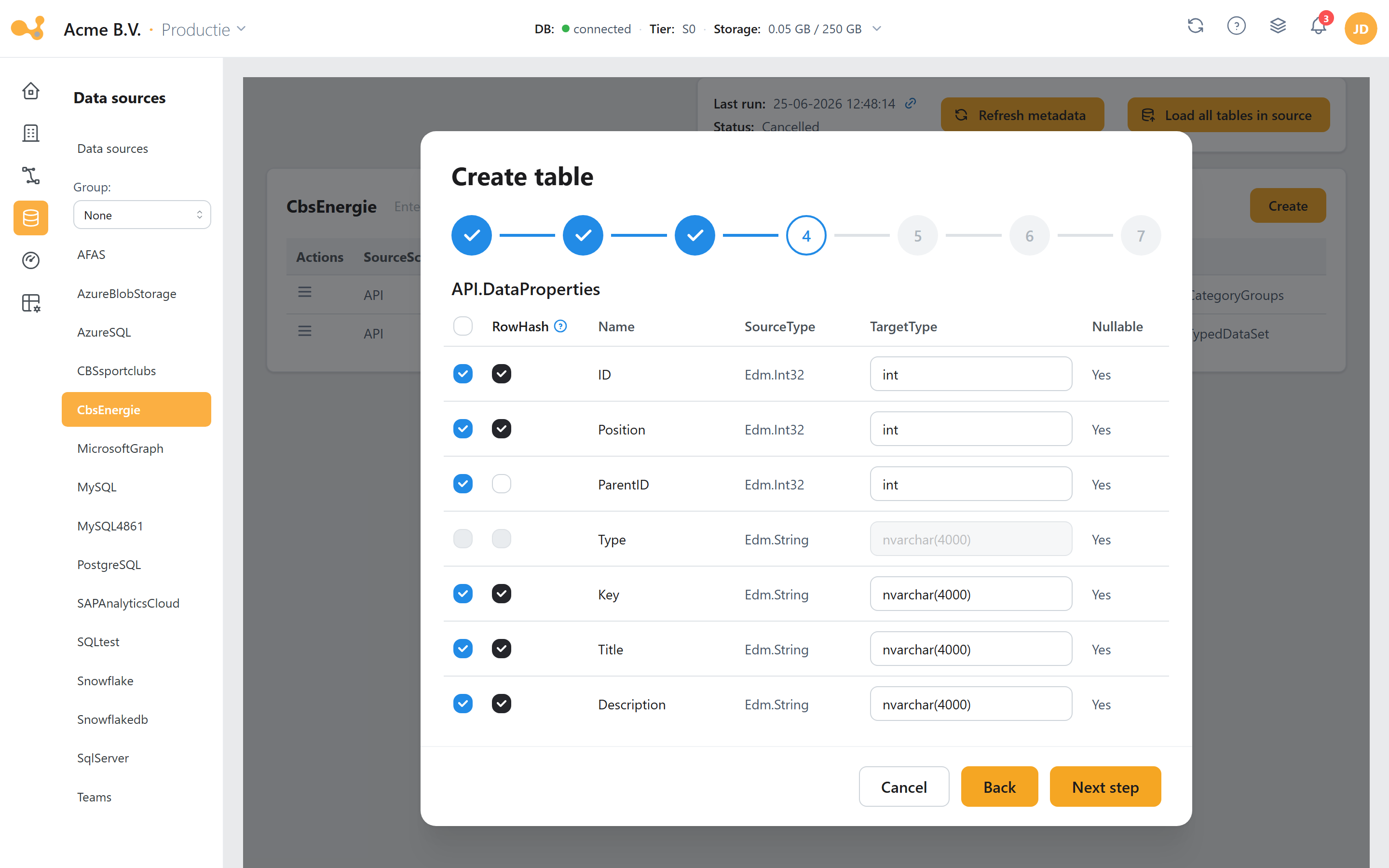
The Add table wizard runs through seven steps — Project, Schema/table, Columns, Load type, Key column, Options and Overwrite — before the table is registered. No data is loaded yet; the wizard creates the STAGE and HIS tables and records a change.
- Step bar — the seven steps; you are now on Columns.
- Selected source table — the source schema/table you chose in step 2.
- Check columns — tick the columns you want to load (or use "select all").
- RowHash column — columns with RowHash ticked are tracked for SCD2 change detection; reserved names (
rowhash,etl_date,etl_enddate,iscurrent,delta,keyhash) are blocked. - Override TargetType — adjust the target type or size per column.
- Back / Next — navigate through the steps; Next leads to Load type, Key column and Options.
Step 4 — Load type & delta columns
In the Load type step you choose one of the seven types. The Delta column and Additional delta column fields appear only when the load type starts with DELTA or is ADDITIONAL. Points of attention:
- The delta column comes from the columns selected in step 3 (
Loadmanagement.Dictionary). - For source type
SAP_BDCthe delta column is fixed toETL_DATE. - A second delta column is optional and must have the same data type as the first. Two delta columns are supported for all SQL/database sources (SQL Server, Azure SQL Database, MySQL, PostgreSQL, Oracle, DB2, Sybase, Snowflake, OneStream). See Multiple delta columns for how the engine combines them.
Step 5 — Key columns
Key columns uniquely identify a row and determine the KeyHash. You have three modes:
- Predict — Yres predicts the key (read-only display of the suggestion).
- Manual — you tick the key columns yourself; at least one is required. By default only NOT NULL columns are shown; with "Show nullable columns" you also see nullable columns.
- No key — only available for OVERWRITE and ADDITIONAL (these types do not match on a key).
Related settings
- Key columns — identify records uniquely; determine the
KeyHash. For all SQL/database sources, two delta columns are possible (comma-separated inLoadManagement.UsedTables.deltaColumn, same data type — the highest value counts). - Staging (
DefaultKeepStage) — whether the STAGE table is truncated or kept after processing. The engine reads this per table (keepStage), not directly from the global setting. - Surrogate keys (
DefaultSurrogate) — automatically generated keys, stored in[LoadManagement].[SurrogateKeys]. Toggled per table viafxGetSurrogate(@Target). - Pagination (
UsePagination/PageSize) — process large datasets in pages during the STAGE→HIS merge.
See also History & SCD2, Connecting & loading a data source and the glossary.