Data flow
This page describes how Yres runs a single load: from the moment a pipeline starts to the moment the data sits historized in the data warehouse. It is the common thread beneath all other concepts — once you understand this flow, you understand why a load type does what it does and where monitoring gets its numbers.
The core idea: metadata steers, code is generic
Nothing about a specific customer's tables is hardcoded in ADF or in SQL. The database publishes, through a single view, "here is every table that needs to be loaded, with all its parameters"; ADF reads that view, fans out, copies bytes into the staging table and calls back into SQL to do the actual merge.
Adding a source = inserting metadata rows, not writing a pipeline.
- The contract view is
[LoadManagement].[vwExtractor]. It is a one-liner pass-through:SELECT * FROM [LoadManagement].[fxExtractor](NULL,NULL). - All the logic therefore lives in the table-valued function
[LoadManagement].[fxExtractor]((@LoadFilter, @LoadType)— just two parameters). Every row thatfxExtractorreturns is one table to load, with all the parameters ADF passes downstream: the load type, the ready-madeDeltaScript, the target schema names, file/parse options and the pagination settings.
ADF is a generic executor. The load logic lives entirely in SQL. ADF only moves bytes into STAGE.<Target> and then calls a stored procedure.
The flow at a glance
The authoritative orchestrator is the pipeline Dynamic Workflow YRES (on older versions it is still called Dynamic Workflow IRIS). It receives parameters — Source, Schema, Table, LoadType, RunningTier, RevertToTier — and runs through the following steps.
 Trigger / manual run / web-app call
   params: Source, Schema, Table, LoadType, RunningTier, RevertToTier
        │
        ▼
 Dynamic Workflow YRES
   1. WLS Start workflow        →  [Monitoring].[spWriteLoadStatus]        (log start)
   2. (optional) scale DB up    →  [Config].[spSetDatabaseServiceTier]     (only if a tier is supplied)
   3. Get tables (Lookup)       →  [LoadManagement].[spPrepareWorkload]
                                       └→ vwExtractor → fxExtractor         (which tables + parameters?)
   4. ForEach "Load data"  (parallel, batchCount 5)  — per table:
        ├─ Orchestration - Hub  →  Orchestration - Switch 1 (switch on Source)
        │        └→ Dynamic Pipeline YRES - <Source>
        │              source → Copy → STAGE.<Target>     (ADF only moves bytes)
        ├─ Prepare lake load    →  [LoadManagement].[spLoadLake]        (optional: DataPlatform contains DL)
        ├─ Load DWH             →  [LoadManagement].[spLoadDWH]
        │        └→ [LoadManagement].[spHIS_InsertAndUpdate]   (STAGE → HIS, SCD2 merge)
        ├─ Write lake feed      →  [LoadManagement].[spGetLakeFeed] → Copy → Parquet change feed
        │                          (parallel to Load DWH; only when there are mutations)
        ├─ Truncate STAGE       →  [LoadManagement].[spSTAGE_TruncateTable] (skipped when keepStage=1)
        └─ WLS End load         →  [Monitoring].[spWriteLoadStatus]         (status per step)
   5. Materialize Views         →  [LoadManagement].[spMaterializeViews]
   6. (optional) scale DB back down
   7. WLS End Workflow          →  [Monitoring].[spWriteLoadStatus]         (close out + reconcile)
Step by step
- Start of the workflow.
WLS Start workflowcalls[Monitoring].[spWriteLoadStatus]. That opens a row inMonitoring.LS_Pipeline(one row per run) and logs the first step inMonitoring.LS_Trans(one row per step). - Optional scale-up. If the run is given a higher service tier,
[Config].[spSetDatabaseServiceTier]temporarily scales up the Azure SQL database for heavier work. - Fetch the work list. A Lookup calls
[LoadManagement].[spPrepareWorkload], which returns the list of tables to load viavwExtractor→fxExtractor. Every row carries all the load parameters. - Load per table (ForEach). The
ForEachactivity "Load data" runs in parallel (batchCount5). For each table the following happens:- Source → STAGE.
Orchestration - Hub→Orchestration - Switch 1switches on the value ofSourceand starts the right source pipelineDynamic Pipeline YRES - <Source>. It runs a singleCopyactivity that literally copies the source data intoSTAGE.<Target>, adding anETL_Datecolumn. Here ADF only moves bytes. - STAGE → HIS.
Load DWHcalls[LoadManagement].[spLoadDWH], which — after an arbitration check against a running archiving run — calls[LoadManagement].[spHIS_InsertAndUpdate]. This procedure does the actual, set-based SCD2 merge fromSTAGEinto the history layer (see SCD2 & hashing below). - Optionally to the Data Lake. If the table also sits on the Data Lake platform (
DataPlatformcontainsDL),Prepare lake loaddetermines up front which rows mutate in this run andWrite lake feedwrites those mutations away as a Parquet change feed — in parallel withLoad DWH, and only when something actually changed. See Lake feed. - Clean up STAGE.
[LoadManagement].[spSTAGE_TruncateTable]empties the staging table — unlesskeepStage=1is set for that table, in which case STAGE is preserved. - Log status.
WLS End loadwrites, viaspWriteLoadStatus, the status (RUNNING/SUCCEEDED/FAILED) and the row counts per step.
- Source → STAGE.
- Materialize views. After all tables,
[LoadManagement].[spMaterializeViews]runs to refresh persisted/reporting views. - Optional scale-down. If a scale-up happened,
Set DB Tier Backreturns the database to the base tier. - Close out.
WLS End Workflowcloses the run, reconciles any leftover statuses and writes the final status.
The only place where Yres actually moves data is the ADF Copy activity (source → STAGE, and optionally the mutations → Parquet). All the logic — what is new, what changed, what must be closed out, how history is built — lives in the SQL procedure spHIS_InsertAndUpdate. That is the strict separation between orchestration and logic.
SCD2: the history layer
spLoadDWH first performs an arbitration check: if a RUNNING archiving run (a LoadLog row with LoadType ARCHIVING) still exists for this target, it deliberately fails the load — loading and archiving must not touch the same table at the same time. It then calls spHIS_InsertAndUpdate (the old call to spUpdateETL_EndDate is commented out — closing out versions now happens inside spHIS_InsertAndUpdate itself). Exactly what the merge does depends on the load type, but the mechanism is the same SCD2 model (Slowly Changing Dimension type 2) for all types:
STAGEhas two persisted computed columns,KeyHashandRowHash(varbinary(66), viaHASHBYTES('SHA2_512', …)).KeyHashis computed over the key columns,RowHashover the change-sensitive columns.- The match join is
STAGE.Keyhash = HIS.Keyhash AND HIS.isCurrent = 1; a row has changed if, in addition,STAGE.Rowhash <> HIS.Rowhash. A column withRowhash = 0does not count toward change detection. - Every history row gets an
ETL_Date(load timestamp) and anETL_EndDate. An open (current) version has the sentinel'2999-01-01 00:00:00'andIsCurrent = 1. When a row changes, the old version is closed out (IsCurrent = 0,ETL_EndDate= the newETL_Date) and a new current version is added.
FULL is a history-preserving SCD2 upsert: new records are inserted, changed records get a new version (the old one is closed out), and records missing from this batch simply stay open. Only OVERWRITE wipes history (truncate of HIS); RELOAD closes out the old generation but preserves it as history. See Load types for the full table.
Variants of the workflow
| Pipeline | When |
|---|---|
Dynamic Workflow YRES | Default: discovers via vwExtractor which tables to load and loads them in a ForEach loop. |
Direct Workflow YRES | Loads one specific target, without the discovery loop. |
Dynamic Archiving Workflow YRES | Archiving: copies old history to Parquet with verification and then purges, driven by the ArchivingScript on vwExtractor. |
In Orchestration - Switch 1 the Oracle case points to the pipeline Dynamic Pipeline YRES - MySql — so Oracle is handled through the MySql ingestion pipeline.
Where you see the flow again
Every ADF step calls spWriteLoadStatus, which logs into three tables:
Monitoring.LS_Pipeline— one row per run.Monitoring.LS_Trans— one row per step (status + row counts + log).LoadManagement.LoadLog— one durable row per table load (status, start/end, config snapshot).
For analysis there are monitoring views: vwLoads (timeline per pipeline) and vwMonitor (broader, including view materialization and Power BI refresh). The system checks live in [Maintenance].[vwYresChecks] (the source file is still named vwIrisChecks.sql).
In the frontend you see this on the Load management → Monitoring screen:
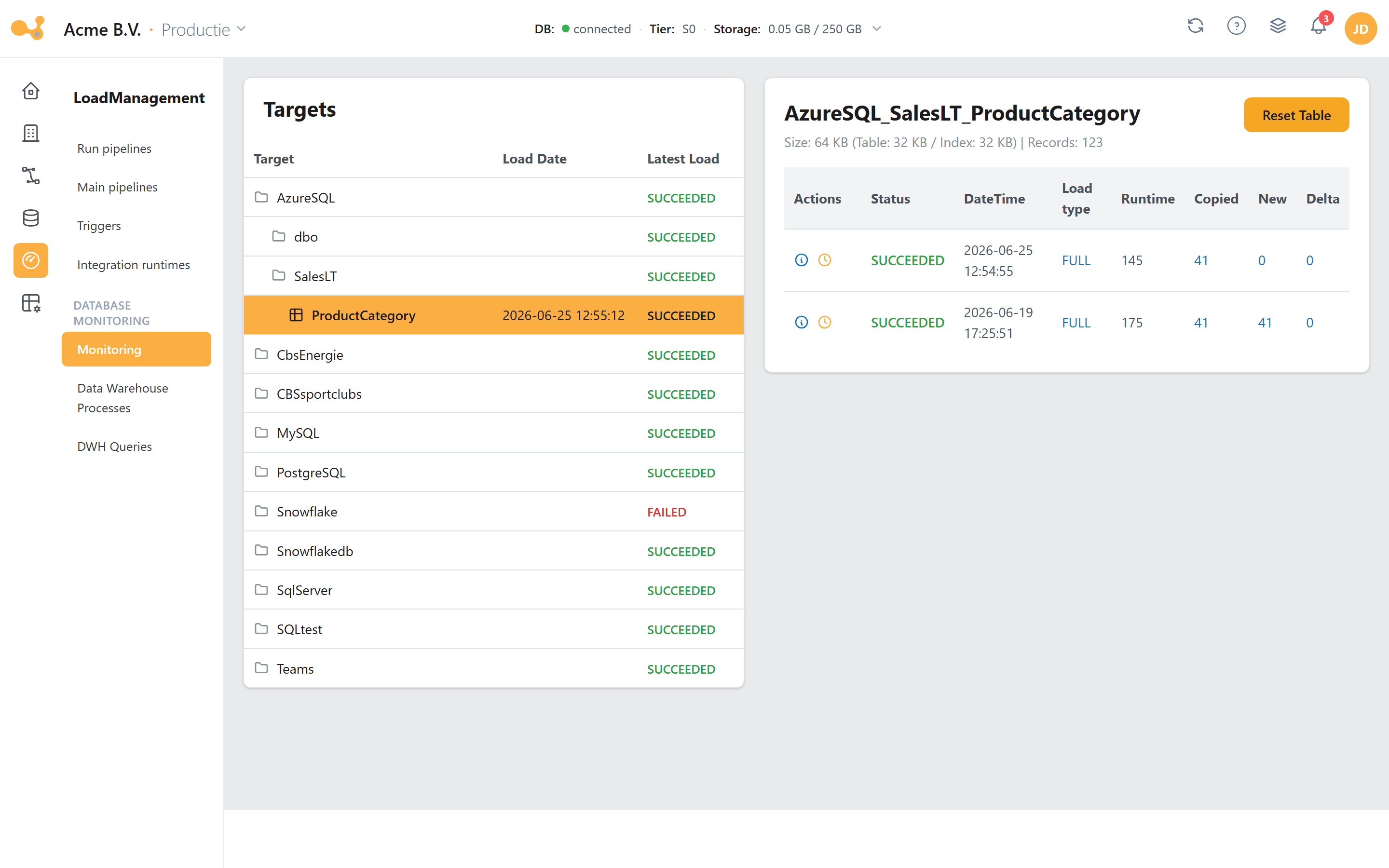
The Monitoring screen reads directly from Monitoring.LS_Trans; for a failed run the error message and a link to the ADF run appear above the overview.
- Targets tree — Source / Schema / Table with a status roll-up per level.
- Selected target with a summary of size and record count.
- Reset table — resets the table (with confirmation).
- Runs grid — per run: Status, DateTime, Load type, Runtime, Copied, New and Delta.
- Per-run actions — the info icon opens the steps modal; the clock icon starts a rollback.
- Steps modal — Step / DateTime / Status / Log / Rows per step within the run.
See also
- Load types — what each type does to the target table.
- Yres explained — the platform in plain language.
- Glossary — terminology (HIS, STAGE, ODS, Dictionary, …).
- Connecting & loading a data source — adding a source and loading it.