Features
A data platform you can understand and manage. Yres turns disparate data sources into a standardised data platform in Azure. All the essential functionality for data ingestion, monitoring and management is there out of the box — without writing a single line of code.
Yres runs entirely in your own Azure environment. The platform reads metadata to determine what needs to be loaded, copies each source into a staging layer and automatically builds a historical data warehouse (SCD2) on top of it. Below are the six core capabilities, each tied to a concrete platform capability.
1. Connect all your data sources without custom work
Connect systems such as SAP, Salesforce, AFAS, Exact Online, databases (SQL Server, Azure SQL, MySQL, PostgreSQL, Oracle, DB2, Snowflake), OData and REST sources, and file sources directly to your data platform. You add a new source through a wizard: you fill in the source name, type, integration runtime and credentials, and Yres generates the corresponding Linked Service and pipelines in Azure Data Factory for you.
There is no hand-written script or custom pipeline required. Under the hood, adding a source is nothing more than writing metadata rows; ADF executes that metadata generically. Credentials never reach the frontend — they are stored in your Azure Key Vault.
See the integration catalogue for all supported sources and the connecting a data source guide.
2. Automate data flows and prevent duplicate records
From raw source data to a structured data warehouse: everything runs automatically and in a controlled way. Pipelines and triggers ensure consistent data flows without manual effort.
The heart of the automation is the load engine: for each table you choose a load type that determines how new data is merged with the existing history. Yres detects changes using hashes (KeyHash on the key columns, RowHash on the tracked columns), so that no duplicate records are created and only genuine changes produce a new version.
| Load type | What it does | History |
|---|---|---|
| FULL | Upsert: add new rows, version changed rows, leave the rest untouched | Retained (SCD2) |
| DELTA | Only records changed since the watermark | Retained |
| DELTAIMAGE | DELTA + closes missing keys within the delta window | Retained |
| IMAGE | Full snapshot: upsert + closes all missing keys (soft-delete) | Retained |
| OVERWRITE | TRUNCATE the history table, then reload all staging rows | None (truncate) |
| RELOAD | Closes all current rows, then reloads all staging rows | Retained (old generation closed) |
| ADDITIONAL | Pure append — no key match, duplicates allowed | Retained |
FULL retains SCD2 history — it is a history-preserving upsert, not a full replacement. Only OVERWRITE removes history (truncate). RELOAD does retain history: it closes the old generation (sets isCurrent=0) and then inserts again. So OVERWRITE and RELOAD are not synonyms.
Read more in Load types and SCD2 & history.
3. Schedule and monitor every load
Loads run whenever you want. You start them manually or let them run automatically via triggers (a schedule in the time zone of the logged-in user). In the Monitoring screen you see, per target table, the latest status, the pipeline runs and the individual steps — succeeded, failed or still in progress.
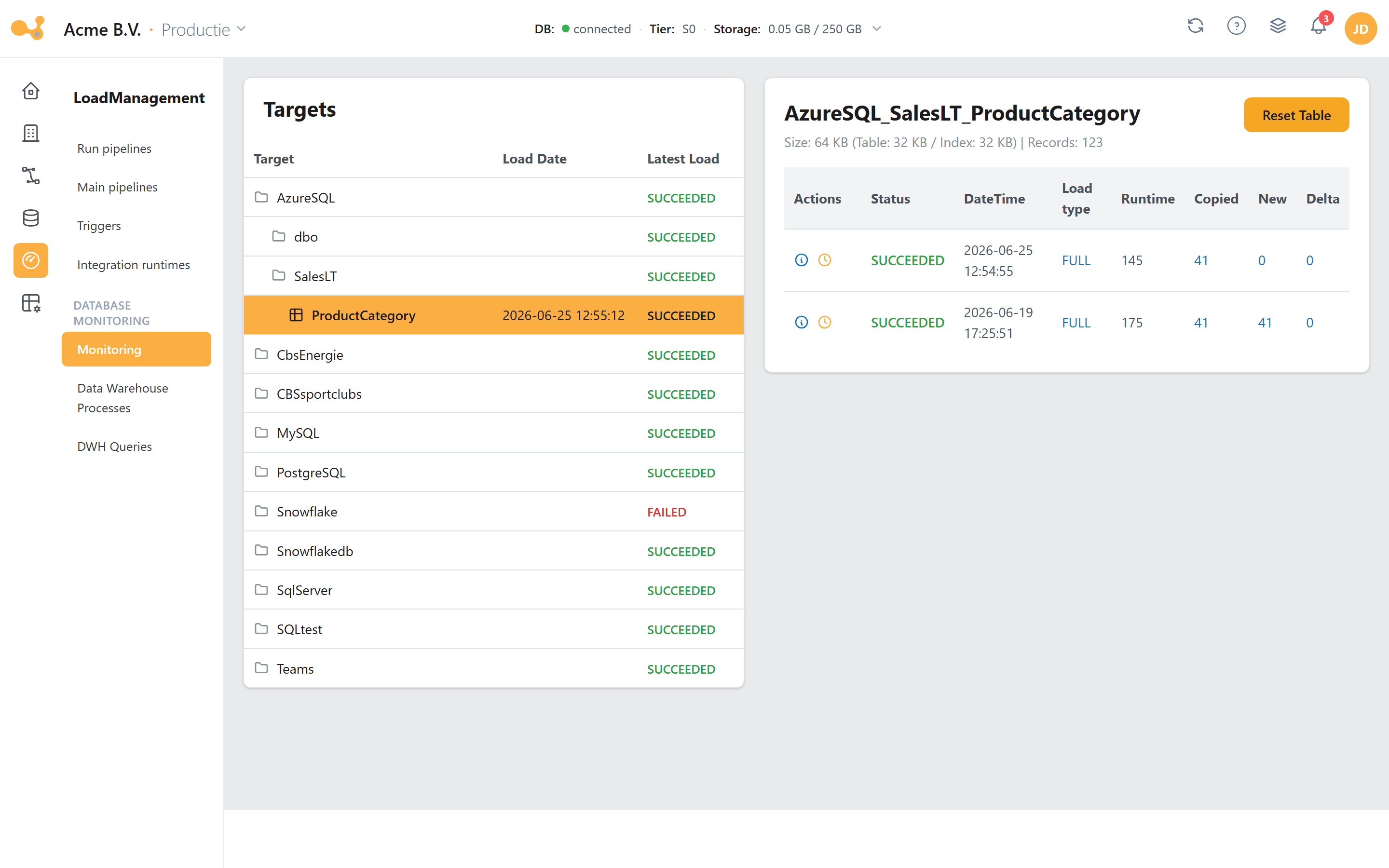
The Monitoring screen: per target table, the load status, the runs and their steps — with the option to reset a table or roll back a run.
- Targets tree — source / schema / table, with a status roll-up per source (succeeded / running / failed).
- Selected target plus a summary of size and record count.
- Reset table — return the table to a clean state (with confirmation).
- Runs grid — Status, DateTime, Load type, Runtime and the Copied / New / Delta counts per run.
- Per-run actions — the info icon opens the step overview, the clock icon rolls the run back (rollback).
- Steps — Step / DateTime / Status / Log / Rows; for a failed run the error message appears with a direct link to ADF.
Behind the scenes, every load is logged via [Monitoring].[spWriteLoadStatus] to LS_Pipeline (one row per run) and LS_Trans (one row per step). You read the overviews back through the views vwLoads (timeline per pipeline) and vwMonitor (broader, including materialized views and Power BI refresh).
See Load Management and Monitoring & logging.
4. See the impact of changes instantly
Full visibility into your data platform: which data flows exist, how they are connected to one another and what happens when you change something. Logging, monitoring and impact analysis help you find and resolve problems quickly.
Yres provides visual lineage at object level (tables, views, procedures, functions, materialized views) with impact analysis. Column-level lineage is currently not available.
5. Apply changes safely — with rollback and recovery
Yres supports the full lifecycle of your data platform, from development to production (DTAP). You test changes first on a dev environment, roll them out to test and production in a controlled way, and you can return to an earlier state whenever that is needed.
- Changes & DTAP — structural changes are bundled into a change, released, and then imported or installed in the next environment. On install, Yres also publishes the corresponding ADF pipelines to the target factory.
- Rollback per load — a failed or unwanted load can be rolled back per table from the Monitoring screen; the SCD2 history makes this possible.
- Reset — return a target table to a clean state.
Projects & Changes are only available for organisations with more than one environment. An Essentials licence has a single environment and does not use this functionality.
For managed changes, data is preserved. Note: a full Rebuild to factory settings overwrites non-Yres configuration — use that feature deliberately.
See Changes & releases and Rollback & reset.
6. Let Azure work for you without managing it yourself
Azure resources are automatically provisioned, scaled and maintained within your own environment — you spend no time on complex infrastructure or manual configuration. During installation, Yres creates the Data Factory, Azure SQL database, Key Vault and (optionally) Storage for you.
Automatic scaling saves costs: via the AutomaticDatabaseScaling setting (with DefaultServiceTier and HighServiceTier), the database scales up during heavy processing and then back down again. That way you only pay for extra capacity when you actually need it.
Yres does not actively enforce feature gating today; the tier split is the intended setup and is enforceable via the license. The web application firewall is in all tiers; site-to-site VPN is available at an additional cost, depending on your exact requirements.
7. Stay in control of access and usage
Manage centrally who has access to which data. With Azure SSO and role-based permissions (RBAC), everything fits in with your existing security and IT environment. SSO can be enforced per user, and you work with standard roles plus custom CRUD roles.
Because everything runs in your own Azure tenant, your data never leaves your environment. Yres never has direct access to your sources, and all processes keep working — even if you were to stop using Yres. No vendor lock-in.
What you get with every package
- Your data, your environment — by default the platform runs entirely in your own Azure tenant.
- Fast onboarding — a typical installation takes around 20 minutes, depending on the number of environments.
- A professional way of working — separate dev, test and production environments (from Advanced onwards; Essentials has a single environment).
See Pricing for what is included in each package.