Troubleshooting
This page takes you from problem to solution quickly when installing Yres, connecting sources and loading data. For each situation you'll find the recognition (the message or symptom), the cause and the solution. For structural DWH checks, use the Health checks screen; for reading load errors, see the Monitoring & logging page.
1. Deployment rights error
Recognition — an API call (for example during provisioning or when creating an Azure resource) fails with a message that a resource provider is not registered or not allowed.
Cause — if a resource type has never been created by a user on an Azure subscription, the corresponding resource provider is not registered. An API call therefore cannot create that resource.
Solution — register the required resource providers on the subscription before you continue with the installation. After that, provisioning can create the resource after all.
The app registration needs the Owner role on the subscription (not just Contributor): during provisioning Yres itself assigns roles to managed identities. See the installation guide.
See also the Microsoft documentation on resource providers.
2. Loading local files fails
Recognition — when loading a Local files or File Server source, ADF returns an error such as:
The value of the property '' is invalid: 'Access to serverName is denied,
resolved IP address is ::1, network type is OnPremise'.
Cause — by default the self-hosted Integration Runtime denies access to the local file system
of the machine it runs on. File Server and Local files require a self-hosted IR (the
cloud IR AutoResolveIntegrationRuntime cannot reach on-prem files).
Solution — enable -EnableLocalMachineAccess on the Windows server where the Integration Runtime runs.
Run the following in CMD or PowerShell:
cd "C:\Program Files\Microsoft Integration Runtime\5.0\Shared\"
.\dmgcmd.exe -EnableLocalMachineAccess
Then restart the source load. See also Data source requirements for which sources need a self-hosted IR.
3. Integration Runtime offline
Recognition — a load that runs through a self-hosted IR hangs, times out, or reports that the
Integration Runtime is unreachable/Unavailable. Applies to on-prem databases (MySQL, DB2, SQL Server,
Oracle, PostgreSQL) and file sources.
Cause — the self-hosted IR service (pwccIntegrationRuntimeLinked) on the gateway machine is not running,
has no internet connection towards Azure, or the machine is switched off.
Solution:
- On the gateway machine, check whether the Microsoft Integration Runtime service is running
(
services.msc→ start the service if it is stopped). - Check the outbound network connection to Azure Data Factory (firewall/proxy).
- In the Integration runtimes screen, check whether the IR is shown as online.
- For a shared IR (version ≥ 1.55): check that the sharing environment has not unlinked the IR.
4. Credentials expired or invalid
Recognition — a source that worked before now fails with an authentication/authorization error (for example
401, 403, "invalid credentials", "token expired" or "SAS expired").
Cause — Yres stores no secrets in the webapp; they live in the customer's Azure Key Vault
(secret group adf-{sourcename}-…). When creating a source you can set an expiry date
(credentials_expiry); after that date the secret can expire. In addition, tokens and SAS signatures
of sources expire on their own, or the source administrator rotates the password/secret.
Solution:
- Open the source and update the credentials. Yres writes the new secret to the Key Vault; the linked service references it.
- If desired, set a new expiry date.
- For OAuth2 sources (such as Exact Online, Salesforce, SAC): check whether the refresh/access token is still valid and re-authorize if necessary.
- Restart the load.
For sources with expiring tokens, agree on a recurring moment to refresh credentials, so a load does not unexpectedly come to a halt.
5. Type mapping error during loading
Recognition — a load fails on a conversion or overflow error (for example a string that is too long, a
numeric overflow, or a date that does not fit the target type). The error appears in the
DWH logs or in the Health checks screen.
Cause — the source data type is not (correctly) mapped to a SQL target type. The mapping is determined
by [LoadManagement].[fxGetDataType] based on TypeMapping/GlobalTypeMapping; if a mapping is missing,
a column can land on a target type that is too narrow or wrong.
Solution:
- Open Type mapping on the source and check the mapping of the problem type.
- Add the missing mappings, or set a wider target type (the standard mapping job is additive and only fills in missing mappings — existing mappings are not overwritten).
- For broad application: use Global type mapping in the Admin panel.
- Run the load again and check the log line.
6. License limit reached
Recognition — a source or table no longer loads rows, or a new source/table is rejected. In the
vwExtractor output, rows are missing for over-quota tables.
Cause — the license limits the number of sources, tables and the database size. The gate sits in the
load engine: fxExtractor applies Config.fxCheckLicense('DBSIZE_HIS', …) and ('MAXSIZE_HIS', …), so that
over-quota tables or databases return no rows and therefore do not load. The license is tied to
a one-time invitation link and is enforced in the database.
Solution:
- Check which license tier you are on and what your consumption is (see License & limits).
- Remove or deactivate sources/tables you no longer need, or clean up history.
- If you structurally need more, upgrade to a higher tier (more sources/environments).
Health checks
For DWH issues, the Health checks screen (route /admin/healthchecks,
available from version 1.51) shows the status of the DWH side of Yres. The checks are based on the view
[Maintenance].[vwYresChecks] (the source file is still called vwIrisChecks.sql). The view contains the
expected list of objects and settings and flags common problems — often with a ready-to-use
fix script.
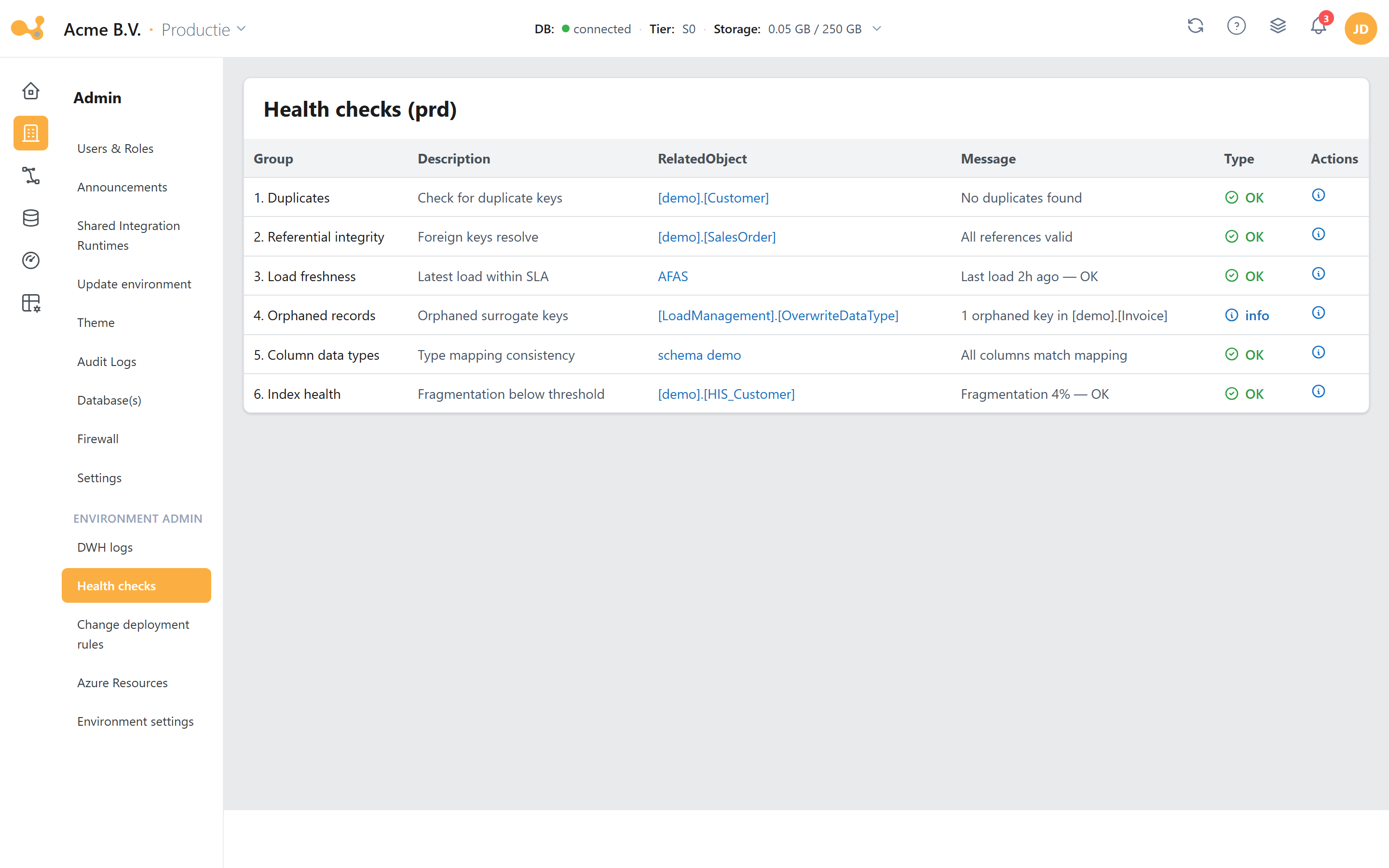
The Health checks screen: at the top a summary (OK / Warning / Error), below it the checks per row; you can expand a check to see the error message and the suggested fix script.
- Status per check — each check is OK, Warning or Error.
- Error message — the concrete message (for example a missing or unknown setting).
- SQL fix script — for many errors the screen proposes a script that repairs the problem.
- Run with caution — a fix script modifies the database; only run it once you understand the effect.
Common settings checks (9.0x)
vwYresChecks compares [Config].[Settings] against the expected roster and flags:
| Check | Meaning | Example |
|---|---|---|
| 9.01 | GodMode is active (Warning) | the GodMode setting is set to active = 1; the check provides a cleanup script that removes the row |
| 9.02 | Value falls outside Options | EnvironmentType = '1' (not a valid DTAP code) |
| 9.03 | Expected setting is missing | a setting from the roster, for example DefaultSurrogate, is not in [Config].[Settings] |
| 9.04 | Unknown setting present | a manually added or outdated setting that is no longer in the roster |
AllowUpdatesInIrisSchemasThis setting is nowadays called AllowUpdatesInYresSchemas (with "Yres"); older versions seeded it
as AllowUpdatesInIrisSchemas (with "Iris"), while the vwYresChecks roster could expect the
Yres name. As a result it was flagged both as missing (9.03) and as unknown (9.04). The upgrade
renames the setting automatically to AllowUpdatesInYresSchemas, keeping the configured value. If you
still see the double flag, the database runs an older DWH version and it will disappear with the next
deployment — it never indicated data corruption.
Only run health-check scripts once you understand the effect — when in doubt, consult a Yres admin.