Rollback & reset
Sometimes you want to undo a load: the source delivered duplicate records, the wrong load type was used, or an expired credential delivered partial data. Yres offers two recovery actions for this, both of which operate on a single table:
- Rollback — rewinds a table to its state at a chosen point in time. Everything inserted, changed, or closed since that moment is undone. The older history remains in place.
- Reset — completely empties a table (truncate). All history disappears and the table starts again from scratch.
Both actions run as SQL in the data warehouse ([LoadManagement].[spRollback] and [LoadManagement].[spReset]); ADF only starts them as a pipeline. Just as with a regular load, ADF is the generic executor and the logic lives in SQL.
Both procedures perform DELETE/TRUNCATE on the history schema (HIS/ODS). A reset is irreversible: the entire table contents are gone. A rollback removes all loads after the chosen point in time. Always double-check the correct table and date first. Both procedures support a dry-run (@Execute = 0) that only prints the script that would run without changing anything — use it to validate before you actually execute.
Where you start it
Rollback and reset are offered in the webapp from the monitoring screen (Load management → Monitoring): for each loaded table you can select a specific load and from there start a rollback to that moment, or reset the table in its entirety.
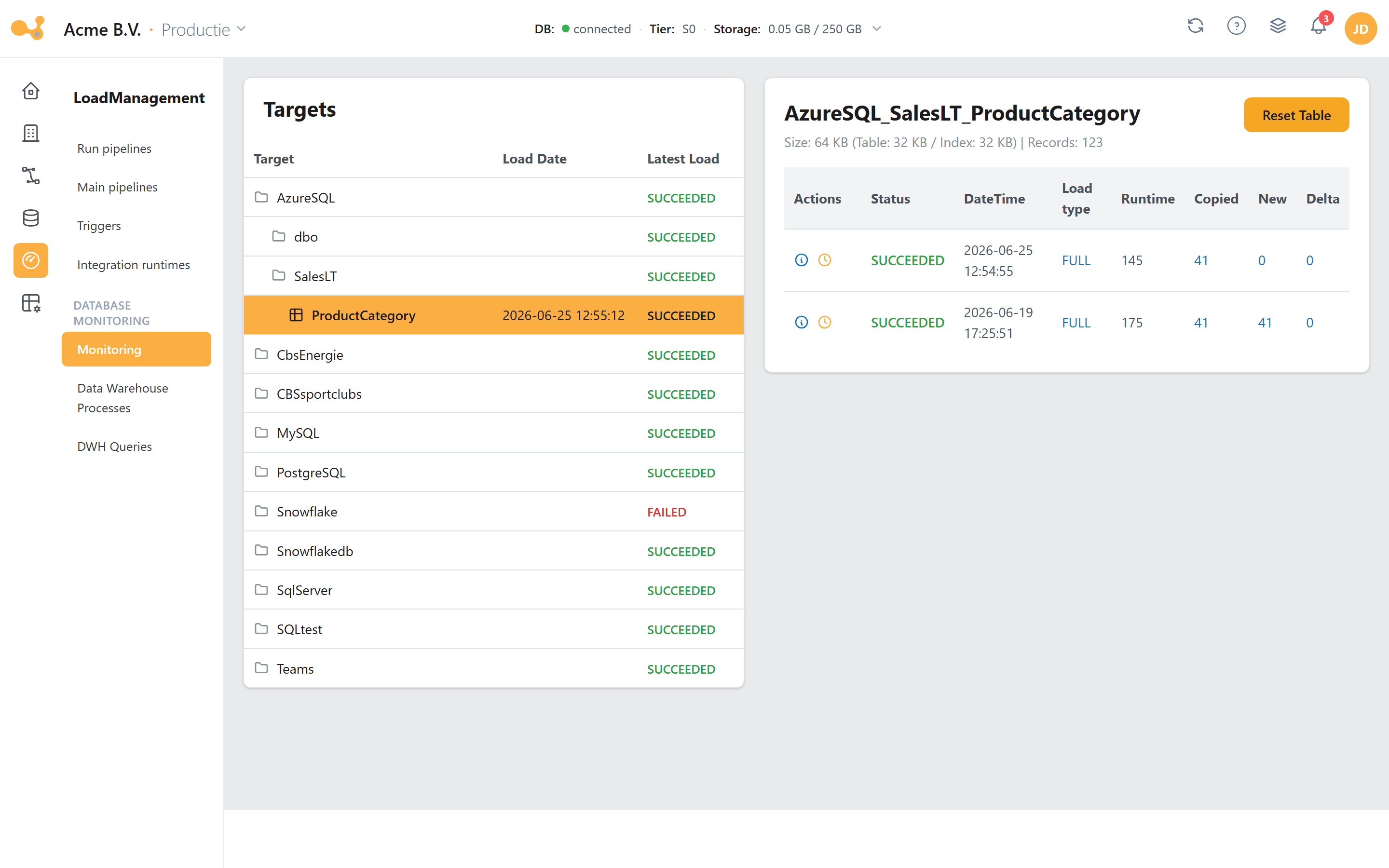
The monitoring screen shows, per table, the most recent loads, their status, and duration. From here you start a rollback (back to a chosen moment) or a reset (empty the table completely).
(1) The table list with, per row, the most recent load, status, and number of rows. (2) A timestamp for each load — that timestamp is what you use as the boundary for a rollback. (3) The rollback/reset action per table.
Behind the scenes the webapp starts an ADF pipeline for this (Rollback or Reset); you can track the progress in the Job Monitor at the top right, alongside the other system tasks (loads, metadata refreshes, view persistence).
The described behavior of spRollback/spReset and the ADF pipelines Rollback/Reset has been verified against the code. You find the buttons in the Monitoring screen (see the screenshots in Load management).
Rollback — back to a point in time
[LoadManagement].[spRollback] rewinds a single table to its state at a chosen moment. It takes four parameters:
| Parameter | Type | Meaning |
|---|---|---|
@Execute | BIT (default 0) | 0 = only print the script (dry-run); 1 = actually execute. The ADF pipeline always sets this to true. |
@HIS_TABLE | NVARCHAR(1024) | The target table in the history schema you want to roll back. |
@DateTime | DATETIME2 | The boundary timestamp. Everything loaded after this moment is rolled back. |
@AppUser | NVARCHAR(4000) (default 'Unknown') | The logged-in user, for the audit log. |
What a rollback does exactly
Based on the boundary timestamp @DateTime, the procedure performs (in summary) these steps on the table:
- Remove newer loads — all rows with
ETL_Date > @DateTimeare removed from the history schema (DELETE). These are exactly the records that were inserted after the boundary timestamp. - Clean up surrogate keys — if the table uses surrogate keys (
fxGetSurrogate= 1), the keys added after the boundary timestamp are removed fromLoadManagement.SurrogateKeys. - Reopen closed versions — versions that were closed after the boundary timestamp are marked as current again:
IsCurrent = 1andETL_EndDate = '2999-01-01 00:00:00.000'(the open-version sentinel) for rows withETL_EndDate > @DateTime AND IsCurrent <> 1. This way a record that a later load had "closed" becomes the current row again. - Reset the watermark — for DELTA tables,
LoadManagement.UsedTables.LatestRecordis recalculated asMAX(<delta column>)over what remains in the table after the rollback. As a result the next DELTA load neatly resumes from the right point.
The net effect: the table is back exactly as it was after the last valid load before the boundary timestamp. The history prior to that is fully preserved.
The procedure takes a @DateTime and undoes everything loaded after that moment — including all loads that ran after the selected load. If you want to undo one specific load, in practice you choose the timestamp of just before that load.
Reset — empty a table completely
[LoadManagement].[spReset] is more drastic: it truncates the entire table. No history remains. It takes three parameters:
| Parameter | Type | Meaning |
|---|---|---|
@Execute | BIT (default 0) | 0 = only print the script (dry-run); 1 = execute. The ADF pipeline sets this to true. |
@HIS_TABLE | NVARCHAR(1024) (default NULL) | The target table you want to empty. |
@AppUser | NVARCHAR(4000) (default 'Unknown') | The logged-in user, for the audit log. |
What a reset does exactly
- Truncate the table —
TRUNCATE TABLE <HIS-schema>.<Target>. All rows disappear and the IDENTITY counter (<…>_RowId) is reseeded. - Clear the watermark — for DELTA tables,
LoadManagement.UsedTables.LatestRecordis set toNULL, so the very next DELTA load fetches everything again from the start.
A reset therefore returns the table to "factory settings": empty, ready to be loaded full again. The table definition itself (columns, load type, keys) stays in place; only the contents are removed.
Rollback vs. reset — when to use which
| Rollback | Reset | |
|---|---|---|
| Goal | Undo one or more incorrect loads | Start a table over completely |
| Effect on data | DELETE of rows after the boundary timestamp + reopening of then-closed versions | TRUNCATE of the entire table |
| History prior to that | stays preserved | disappears completely |
| Parameter that defines the scope | @DateTime (boundary timestamp) | none — always the whole table |
DELTA watermark (LatestRecord) | recalculated (MAX of what remains) | set to NULL |
| Reversible? | No (the removed newer loads are gone, older history remains) | No (everything gone) |
Rule of thumb:
- Rollback when one recent load went wrong and the older history is correct — for example a DELTA load that brought in duplicate records because of a source error.
- Reset when the table is structurally polluted and you want to rebuild it cleanly, or for a one-off restructuring.
How ADF drives it
The webapp runs both actions via a dedicated ADF pipeline (folder PW - Yres/TechnicalPipelines/Backgroundtasks). Both pipelines contain a single SqlServerStoredProcedure activity against the linked service YresDwh, with Execute = true.
Pipeline Rollback calls [LoadManagement].[spRollback] with parameters:
| Pipeline parameter | Passed to proc | Default |
|---|---|---|
Table | @HIS_TABLE | Unknown |
DateTime | @DateTime | 2999-12-31 23:59:59 |
AppUser | @AppUser | Unknown |
Pipeline Reset calls [LoadManagement].[spReset] with parameters:
| Pipeline parameter | Passed to proc | Default |
|---|---|---|
Table | @HIS_TABLE | Unknown |
AppUser | @AppUser | Unknown |
If the SQL activity fails, a second activity (WLS … table Failed) runs that writes the error away via [Monitoring].[spWriteLoadStatus] with Process = 'Maintenance' and Status = 'FAILED'. This way a failed rollback/reset simply appears among the other messages in monitoring.
Auditing — LoadManagement.DeletedLoads
Every rollback and reset action is recorded in the table [LoadManagement].[DeletedLoads]. At the start, the procedure writes a row with status Initiating; during and after completion it updates that row (Running → Succeeded, or Failed … on an error, or Deletion script printed for a dry-run). The table tracks, among other things:
| Column | Contents |
|---|---|
ProcessID | Unique id of the action — links to the messages in Config.ProcessLog. |
TableName | The affected table. |
DateFrom | The boundary timestamp (only filled for a rollback; NULL for a reset). |
AppUSer | The user who started the action. |
DeletedRecords | Number of rows deleted (for a rollback). |
DurationMS | Run time in milliseconds. |
Status | The progress/outcome (Initiating / Running / Succeeded / Failed … / Deletion script printed). |
In addition, every step logs via [Config].[spWriteMessage]/spWriteError/spWriteCrash to [Config].[ProcessLog]. At the end the procedure also returns that process log as its result, so you immediately see what happened. All recovery actions are therefore fully traceable.
Frequently asked questions
Does a rollback or reset change the table definition? No. Columns, load type, key columns, and the table itself remain. Only the data is affected — for a rollback partially (everything after the boundary timestamp), for a reset completely.
Can I roll back multiple tables at once?
The procedures work per table (@HIS_TABLE). If you want to restore multiple tables, you run the action per table.
What happens with the Data Lake / archiving? Rollback and reset operate on the history schema in the SQL database. Already archived Parquet files in the Data Lake are not removed by them.
See also
- Load types — what each load type does to the history table (and why OVERWRITE does wipe history but RELOAD does not).
- History & SCD2 — the framework columns
ETL_Date,ETL_EndDate,IsCurrentthat rollback drives on. - Archiving — writing old history away to the Data Lake.
- Glossary.