CI/CD & DTAP
Yres consists of two repositories with two very different deployment models, both of which are promoted across DTAP (Development → Test → Acceptance → Production):
- The data warehouse (
IRIS_DWH, Azure SQL) is rolled out with SSDT/DACPAC (a schema comparison that creates and alters objects). - The ADF factory is rolled out via a Git-integrated publish to the
adf_publishbranch and from there to the target factory.
On top of that, Yres promotes not only code but also structural changes between already-running environments via the runtime change management in the Change schema — you drive this from the change's Actions menu (☰) on the Changes screen (release, reimport, and reinstall are actions in that menu, not separate screens).
This page assumes familiarity with Architecture (high-level) and Azure architecture. For the corresponding screens in the web app, see Projects & Changes.
The two deployment tracks in brief
| Track | Repo | Artifact | How it is rolled out |
|---|---|---|---|
| Data warehouse | DWH/IRIS_DWH | master.dacpac | SqlPackage / Azure DevOps publishes the DACPAC to the target Azure SQL database |
| ADF factory | adf-iris-dev-… | adf_publish branch (ARM template) | The publish-datafactory pipeline deploys the ARM template to the target factory |
The two tracks are rolled out separately, but for a single coherent change they belong together — see Cross-repo ordering.
DWH deployment — SSDT / DACPAC
The data warehouse is a Visual Studio SQL Database Project (IRIS_DWH.sqlproj) that compiles to master.dacpac. On deployment, the DACPAC compares the project against the target database and creates/alters objects so that they match.
Alongside the schema comparison, two scripts run to handle things a plain diff cannot:
PreDeploymentScript.sql — version-gated migrations
PreDeploymentScript.sql runs before the schema comparison and handles drops, renames, and data fixes that a diff cannot safely infer. It is version-gated with a GOTO label pattern:
IF @CURRENT_VERSION_INT <= NNNNN GOTO UPGRADE_NNNNN
- The database version lives in
Config.Settings(the setting is namedIRIS_VERSION, on newer buildsYRES_VERSION). - Upgrades are supported from roughly v1.50 onward; the current target is around v1.56. Very old databases must therefore be upgraded step by step before they reach the latest version.
Yres versions order as decimal fractions, not as semver: 1.9 comes after 1.56. Keep this in mind when judging whether a database already has the target version.
Script.PostDeployment.sql — idempotent seed
Script.PostDeployment.sql runs after the schema comparison and idempotently seeds the baseline content:
Config.Settings(the settings roster),SourceTypeand the defaultTypeMappingrows,- the baseline security.
This script is version-gated too, so that seed blocks run exactly once per version. Because it is idempotent, it is safe to re-run on every deployment.
Schema compare
For manual comparison against a specific database, *.scmp profiles (Schema Compare) exist. You use these for diagnostics and drift detection, not for the automated rollout.
ADF deployment — Git-integrated publish
The ADF factory is Git-integrated. Pipeline JSON is edited on the collaboration branch main; publishing generates the adf_publish branch with the ARM template (ARMTemplateForFactory.json).
The publish configuration (publish_config.json) is:
{ "publishBranch": "adf_publish", "includeGlobalParamsTemplate": true, "enableGitComment": true }
The publish-datafactory pipeline (Azure DevOps)
The CI/CD pipeline publish-datafactory.yml rolls out the factory. The typical flow:
BuildADFTaskvalidates the pipeline JSON.PublishADFTaskdeploys the ARM template to the target factory.
Key settings of this pipeline:
| Setting | Value | Effect |
|---|---|---|
DeleteNotInSource | true | Objects removed from the code are also removed from the factory. |
FilterText | -trigger.*, -integrationRuntime.* | Triggers and the Integration Runtime are NOT deployed by the pipeline. |
IgnoreLackOfReferencedObject | true | Missing references do not block the deployment. |
StopStartTriggers | false | The pipeline does not stop/start triggers during the deploy. |
Triggers (-trigger.*) and the Integration Runtime (-integrationRuntime.*) are excluded from the automated publish and are managed manually. This is prone to drift between environments — check them separately when you provision a new environment or migrate one.
Environment overrides
The pipelines themselves are environment-agnostic: connection strings and secrets are resolved at runtime from the Key Vault of the relevant environment. Per environment, only a handful of properties are patched via deployment/config-{dev,test,prod}.csv. Each line is type,name,path,value and today overrides the Key Vault base URL on the keyvault linked service and the global parameter keyVaultBaseUrl, for example:
- dev →
https://kv-iris-dev-….vault.azure.net/ - test →
https://kv-iris-test-….vault.azure.net/ - prod →
https://kv-iris-prod-….vault.azure.net/
The factory uses a system-assigned managed identity that has get permissions on the environment's Key Vault.
The Key Vault resources are still named kv-iris-… in the code (IRIS branding). The exact Key Vault URLs per customer are set at provisioning time; the values shown here are examples from the repo, not customer truth.
DTAP at the data level — runtime change management
Besides rolling out code, Yres also promotes structural and content changes between already-running environments. This goes through the Change schema — which you drive in the web app from each change's Actions menu (☰) on the Changes screen. There are no separate Release or Install screens anymore: everything happens on the Changes screen. The Changes screen has filters (a Project select, an Only show open projects checkbox, and the Where environment… and Has status filters) and shows a changes table whose columns include Status overview (per-environment progress indicators — green when that step is done, grey when not), NextStep (the suggested next action, e.g. Release on dev / Install on prd), Dependencies (an N dependencies link that opens a dependency graph), and Actions (the ☰ menu per change). The actions in that menu are contextual to the status per environment.
The path is always release → reimport → reinstall, driven from the ☰ menu:
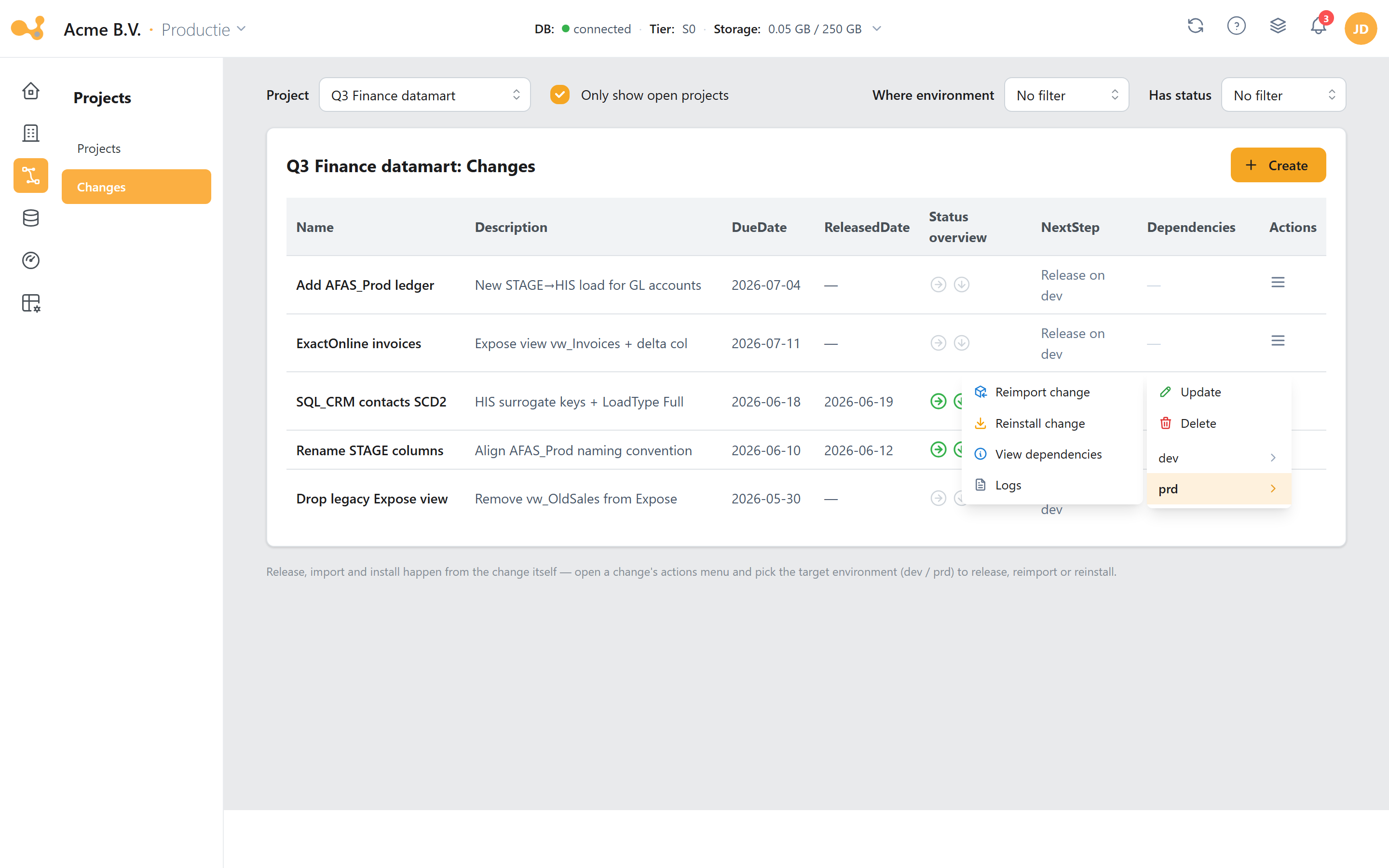
The opened Actions menu (☰) of a change on the Changes screen. At the top are Update and Delete; below them a submenu per environment (dev ▸, prd ▸): on dev an open change offers release change, on a target environment a released change offers Reimport change (DWH only) and Reinstall change (DWH + ADF publish). The menu also has View dependencies (opens the dependency graph) and Logs (the step-by-step import/install log). Everything happens from this menu on the Changes screen, not on a separate screen.
- Changes table — columns Name, Description, DueDate, ReleasedDate, Status overview (green/grey per environment), NextStep, Dependencies (the N dependencies link), and Actions (the ☰ menu). A Create change button sits at the top; the filters narrow the rows shown.
- Status-contextual actions — the items in the ☰ menu appear per environment based on the status: in the dev ▸ submenu an open change shows release change; in the submenu of a target environment (e.g. prd ▸) a released change shows Reimport change and Reinstall change.
- release change — locks the change and runs
[Change].[spRelease]with a dependency check (only on dev, on the open change). - Reimport change — runs
spImportin the target environment. This touches the DWH only and does not publish the ADF factory. - Reinstall change — both imports and installs, and then publishes ADF (see below).
- View dependencies & Logs — View dependencies opens the dependency graph (which changes this one depends on, with their status); Logs opens the step-by-step import/install log. On Reinstall,
publish-datafactoryruns in Azure DevOps and the web app shows a progress notification because the publish is asynchronous.
release → reimport → reinstall — step by step
- Edit in dev and bundle under a Change. Every data-plane edit (new tables, scripted objects) is recorded in
Change.ChangeContentunder a Change, which belongs to a Project. Scripted/custom objects are added to the change from Database objects (the object tree under Data Engineering). - Release the change — in the dev ▸ submenu of the ☰ menu, release change runs
[Change].[spRelease], which validates the dependencies and locks the change (no further edits). Yres blocks releasing if the change contains content that another, not-yet-released change depends on; the error message names that dependent change(s). - Reimport to the next environment — Reimport change in the target environment's submenu runs
[Change].[spImport], which imports the released change (as JSON) into the target environment. This is a DWH-only step. - Reinstall — Reinstall change in the target environment's submenu runs
[Change].[spInstall], which applies the change (@Execute:1= execute,0= print SQL,2= impact analysis). The ADF pipelineInstallChangeis the automation entry point.
Reinstall does three things in sequence:
- Import — runs
spImport(the change JSON is pulled into the target environment). - Install — runs the
InstallChangeADF pipeline if it exists (otherwise the DWH procedureInstallProcedure). - Publish ADF — starts the Azure DevOps pipeline
publish-datafactorywith{ environment: <targettype> }, so that the new data-source pipelines land in the target factory.
That makes Reinstall the step that synchronizes both DWH and ADF; Reimport touches the DWH only.
Inspecting change content, dependencies, and logs
From the Changes screen you can inspect the change without leaving the ☰ menu:
- Change content — select a change to open the content panel: an object tree (source → schema → table → properties such as LoadType, DeltaColumn, ifExists), with a View as table toggle for the same objects as a table.
- View dependencies — opens the dependency graph: which changes this one depends on and what their status is. This is the same check that
release change(via[Change].[spRelease]) enforces. - Logs — opens the step-by-step import/install log: INIT → ADD CHANGES → ADD PROJECT → ADD CHANGE CONTENT → ADD CHANGE DEPENDENCIES → END OF PROCESS, with status and origin per step.
Before an install, Yres checks that the DWH versions of the source and target environments are equal (throwErrorIfDwhVersionDontMatch). If they do not match, the message "Environment versions do not match, please update" appears and nothing is installed. Update the lagging environment first.
Projects and Changes are not available for organizations with a single environment (maintainProject/maintainChange explicitly refuse this). For single-environment organizations, the table wizard automatically uses ChangeId 1 and there is no release/install step. See Projects & Changes.
Change deployment rules translate object names between environments, for example ERP_DEV.Product → ERP_TST.Product → ERP.Product, so that the same change targets the correct physical objects in each environment.
Cross-repo ordering
If a change touches both repos — for example a new connector type that needs both a new ADF pipeline and new SQL metadata/procedures — roll out the DWH first and ADF afterwards:
- DWH first — so that the procedures and views the pipeline calls already exist.
- ADF afterwards — the pipeline can now safely reference those DWH objects.
For a new source instance of an existing type, no code change is usually needed: those are metadata rows (SourceSystems + UsedTables), created via the web app (spMaintainSource / spMaintainTable). The Install flow above then handles promotion between environments.
Further reading
- Projects & Changes — the screens that drive this flow
- Azure architecture — Azure DevOps, Key Vault, and the managed identities
- Installation — provisioning an environment for the first time