Logs & views
Management is best done through the webapp; these objects are for the SQL endpoint (SSMS / Azure Data Studio).
This page describes the log tables and the monitoring and configuration views in the data-plane
database IRIS_DWH. The names, columns, and signatures are taken directly from the source code —
the code is authoritative. See also: Functions and Stored procedures.
The raw logs live in a handful of tables. The views are derived, readable abstractions on top of those tables — prefer the views; they pivot the individual steps into a single row per load.
What gets logged?
The database records four streams of information:
- The creation, modification, and/or deletion of objects (DDL).
- The granting (Grant), denying (Deny), and revoking (Revoke) of user permissions.
- Procedures and their results (messages, warnings, errors).
- Running and completed loads.
These streams land in the following tables:
| Table | Contents |
|---|---|
[Monitoring].[LS_Pipeline] | One row per pipeline run |
[Monitoring].[LS_Trans] | One row per micro-step (the high-volume timeline) |
[LoadManagement].[LoadLog] | One row per table load: durable planner/status state |
[Config].[ProcessLog] | Procedure messages, warnings, and errors |
[Config].[EventLog] | DDL and permission audit (objects and permissions) |
On top of these tables sit views that turn them into actionable insight:
- Load monitoring:
[Monitoring].[vwLoads],[Monitoring].[vwMonitor],[Monitoring].[vwWorkflow],[Monitoring].[vwUsedTables] - User and access management:
[Monitoring].[vwAccessManagement],[Monitoring].[vwUserManagement],[Monitoring].[vwObjectAlterations] - Procedure logs:
[Config].[vwUserlog],[Config].[vwUserLogJSON]
vwLoadMonitor does not existThe name [Monitoring].[vwLoadMonitor] does not appear as a deployed view. Use vwLoads instead (per-pipeline
timeline) or vwMonitor (broader: including materialized views and Power BI refreshes).
Log tables (the raw stores)
[Monitoring].[LS_Pipeline]
One row per pipeline run. Created by [Monitoring].[spWriteLoadStatus] at the steps
Start workflow and Start load.
Columns: WorkflowID, PipelineID, PipelineName, Process, Source_system, Target,
DateTime DATETIME2, Started_by, Schema, Table, LoadType, CopiedRows BIGINT,
LatestRecord DATETIME2, ETLDate DATETIME2.
[Monitoring].[LS_Trans]
One row per micro-step within a load (New rows, Delta rows, Closed rows, Inserted into Target,
page progress, etc.). This is the high-volume timeline that the pivot views (vwLoads, vwMonitor,
vwWorkflow) consume. Every call to spWriteLoadStatus writes a row here.
Columns: PipelineID, Rows BIGINT, Step, DateTime DATETIME2, Status, Process,
log NVARCHAR(MAX).
[LoadManagement].[LoadLog]
The load planner and durable status table: one row per table load. spWriteLoadStatus sets the LoadStatus
to RUNNING, SUCCEEDED, or FAILED and writes the error message to Error. This table is the join backbone
of vwMonitor.
Columns: RowId IDENTITY, Source, SourceSchema, SourceTable, TargetTable, SourceType,
TriggerName, LoadType, Script, LoadName, WorkFlow, Pipeline, PlannedAt, StartedAt,
FinishedAt, LoadStatus, Error, Config, Other, LastRunTime.
[Config].[ProcessLog]
The full application and procedure log. Populated by the Config.spWrite* family
(spWriteMessage, spWriteWarning, spWriteError, …).
Columns: processID, logID, timestamp, callSource, appUser, spName, spStep, returnCode,
message1–message4, dbUser, dbServer, dbName, dbRequest, errorLine, errorMessage,
errorNumber, errorPrecedure, errorSeverity, errorState.
errorPrecedure is not a typo in this wikiThe column really is named errorPrecedure (sic) — that's exactly how it appears in the table and in spWriteError.
Use that spelling verbatim.
An INSTEAD OF DELETE, UPDATE trigger blocks any manipulation of this table unless the setting
Config.fxGetSetting('AllowSettingsUpdates') allows it.
[Monitoring].[RetentionPolicy] (v1.56)
The retention configuration of the log tables: one row per log table with the retention period in days.
Read by [Maintenance].[spApplyRetentionPolicy] (see
Monitoring & logging → Retention). Defaults are
seeded insert-if-missing at deploy time, so your own changes survive.
Columns: RowId IDENTITY, SchemaName, TableName (unique pair), RetentionDays (CHECK ≥ 7),
Active BIT, Description, YresLastUpdated, YresLastUpdatedBy.
[Config].[EventLog]
The DDL and permission audit. The source for the three vw*Management/vwObjectAlterations views.
Columns: EventType, ObjectType, TimeStamp, ServerName, DatabaseName, SchemaName,
ObjectName, script, fullCommand XML, ChangedBy, EventLogID IDENTITY. The same tamper-guard trigger
as ProcessLog protects this table.
Load-monitoring views
In the webapp these views come together on the Monitoring screen.
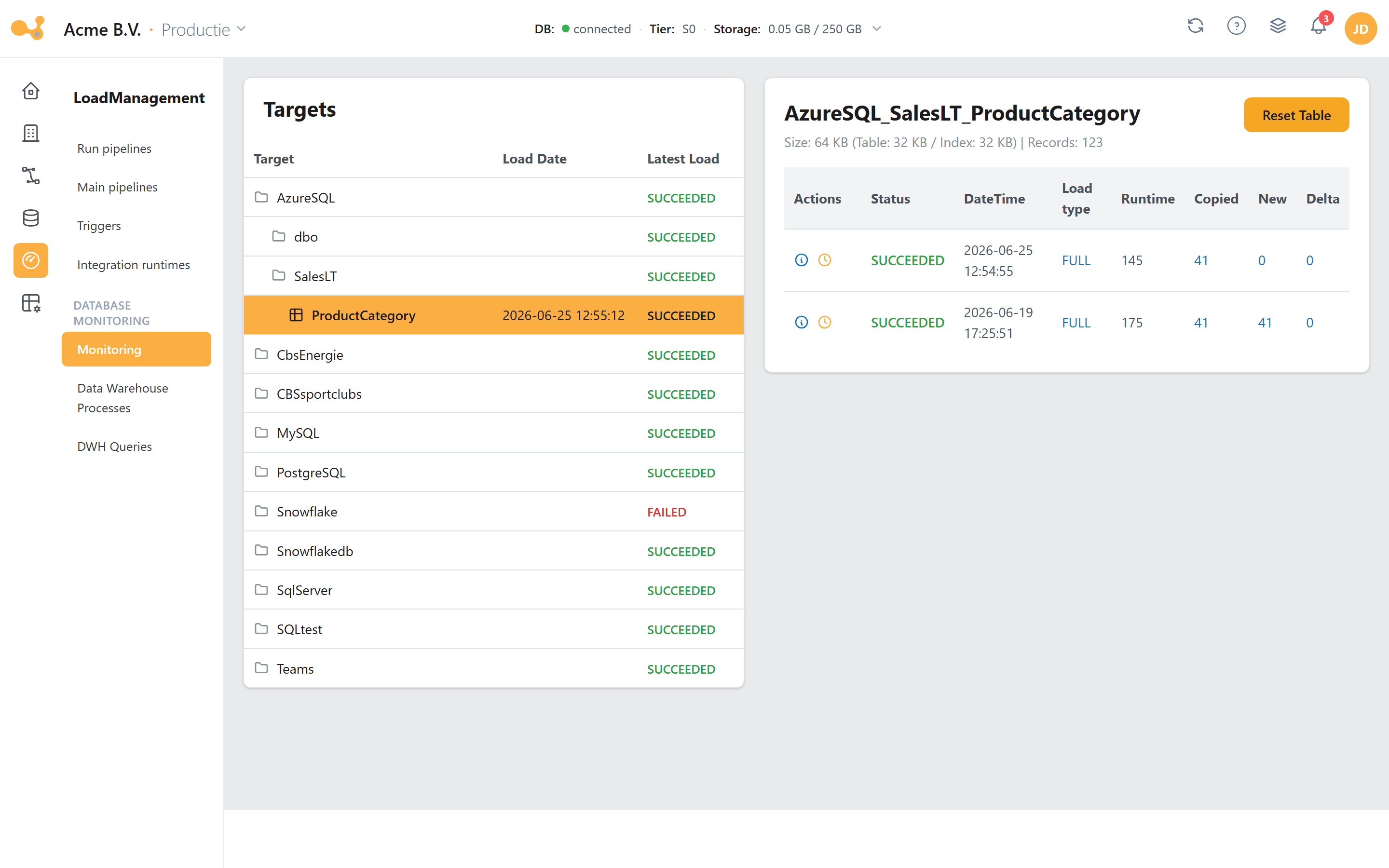
The Monitoring screen reads vwLoads/vwMonitor: select a target on the left and review its runs and their steps on the right.
(1) Targets tree (Source / Schema / Table) showing, per table, the last load date and a status rollup; the tooltip shows "Failed: x | Running: y | Succeeded: z".
(2) Target header with the selected table plus a Size / Records line.
(3) Reset table — empties the table after a confirmation.
(4) Runs grid with Status, DateTime, Load type, Runtime, Copied, New, Delta (from vwLoads/vwMonitor).
(5) Steps modal — opens the individual LS_Trans steps per run (red on FAILED) plus a direct ADF link.
[Monitoring].[vwLoads]
Purpose: the canonical per-pipeline load timeline. It pivots LS_Trans (Process='load') over the
step set [Start load], [Start truncate table], [lookup mapping], [Start load data],
[Start upsert HIS], [Start update ETL_EndDate], [Start update count rows], [End load] and, per step,
computes the start time plus the runtime (DATEDIFF(SECOND, …)). It joins the row-count pivots
(Deleted/Delta/New/Copied rows), a status subselect, the workflow status, the LatestLoad flag, the
Environment (fxGetSetting('EnvironmentName')), and ADF deep links via Loadmanagement.fxGenerateAdfUrl(...).
Times are converted by dbo.fxUTC2CET.
Key columns: among others [LatestRecord] and [LatestLoad], plus a start time per step and
[Runtime sec: …], the row counts, and [Status].
[Monitoring].[vwMonitor]
Purpose: a broader monitor than vwLoads. It runs on LoadManagement.LoadLog (not only on
LS_Trans), left-joins the step/row pivots and DeletedLoads, and UNIONs in two extra sources:
Materialized Views loads and PowerBI Models refreshes (Process IN ('Materialize Views','Refresh_PBI')).
This is the view that fxGetTableLoads and Monitoring.vwUsedTables build on further.
Output columns: [Workflow ID], [Pipeline ID], [Pipeline name], [Source system], [Target],
[DateTime], [Started by], [LoadType], [ETL Date], [Start load], [Start load data],
[Runtime sec: load data], [Start upsert HIS], [Runtime sec: upsert HIS], [Start update ETL_EndDate],
[Runtime sec: update ETL_EndDate], [End load], [Runtime sec: Pipeline], [Copied rows], [New rows],
[Delta rows], [Deleted rows], [Status], [LatestLoad], [Deleted], [Deleted by], [Deleted on],
[WorkflowAdfUrl], [PipelineAdfUrl].
[Monitoring].[vwWorkflow]
Purpose: the timeline at workflow level (not pipeline level). It pivots LS_Trans
(Process='Workflow') over [Start workflow], [Start Get Tables], [Get Tables],
[Start ForEach Table], [ForEach Table], [End Workflow], joins LS_Pipeline (with LatestRecord,
CopiedRows, ETLDate), a last-status subselect, and a LatestLoad flag. Filters
WHERE [WorkflowID] IS NOT NULL.
[Monitoring].[vwUsedTables]
Purpose: per used table, the last load plus status. It UNIONs LoadManagement.vwUsedTables with
CustomYres.Extractor and filters on vwMonitor.LatestLoad='yes'.
Output columns: Source, SourceSchema, SourceTable, LoadType, LatestLoad (= vwMonitor.[ETL Date],
a date), LatestStatus (= vwMonitor.status).
User, access, and object audit views (from EventLog)
[Monitoring].[vwAccessManagement]
Shreds EventLog.fullCommand (XML) into one row per Grantee × Permission for GRANT_*/DENY_*/REVOKE_* events.
Columns: Type, Permission, ObjectType, ServerName, DatabaseName, SchemaName, ObjectName,
Grantee, script, ChangedOn DATETIME2, ChangedBy.
[Monitoring].[vwUserManagement]
User and role lifecycle events (WHERE ObjectType LIKE '% USER' OR ObjectType='ROLE').
Columns: Type, ObjectType, ServerName, DatabaseName, dbUser, RoleName, script,
ChangedOn, ChangedBy.
[Monitoring].[vwObjectAlterations]
DDL changes by real users, excluding permission and user events
(ChangedBy NOT IN ('ADF','Unknown')).
Columns: EventType, ObjectType, ServerName, DatabaseName, SchemaName, ObjectName, script,
ChangedOn, ChangedBy.
Procedure-log views (from Config.ProcessLog)
[Config].[vwUserlog]
A readable representation of ProcessLog.
Columns: ProcessID, Date, Time, timestamp, UserId, User (split from appUser on |),
Process (= spName), [Process step] (= spStep), returnCode, MessageType
(0 = Information, 4 = Warning, 8 = Error, 12 = System Error, 16 = Dump, otherwise UNKNOWN),
Message (CONCAT_WS of message1–message4 + errorMessage), dbRequest (= spCall).
[Config].[vwUserLogJSON]
A per-process, JSON-aggregated view, intended for the webapp.
Columns: process, returnCode (MAX), messageType, timestamp, dbRequest, user, userId,
processID (kept as nvarchar(36) — "DO NOT REMOVE!! USED IN WEBAPP"), Steps
(nested FOR JSON PATH of step → messages).
Engine views (reference)
Besides the monitoring views, the load engine itself uses a number of views. The most important ones:
[LoadManagement].[vwExtractor]
SELECT * FROM [LoadManagement].[fxExtractor](NULL,NULL) — a thin wrapper that exposes fxExtractor with both
parameters set to NULL. The output columns are therefore identical to those of fxExtractor (see
Functions). ADF reads this view to learn which tables need to be loaded.
[LoadManagement].[vwDictionary]
The column-level metadata join used throughout the engine.
Columns: RowId, Source, SourceSchema, SourceTable, SourceColumn, SourceDataType,
TargetDataType, NullAble, KeyColumn, RowHashColumn, FactColumn, Position,
LoadType (default 'FULL'), deltaColumn, TargetSource, TargetSchema, TargetTable,
ActualTableName, ActualStageSchema, ActualHisSchema, keepStage.
Staging tables Dictionary_Stage / Services_Stage
Since June 2026 the metadata refresh (GetMetaData - <source>) no longer fills the live
Dictionary/Config.Services directly, but first two staging tables with the same columns:
[LoadManagement].[Dictionary_Stage] and [Config].[Services_Stage]. An atomic swap promotes
stage → live; with 0 staged rows the live metadata is left in place. The mechanism and its
procedures (spSwapDictionary, spClearDictionaryStage, spFinalizeDictionary and their Services
variants) are described under Stored procedures → Metadata staging.
[<HIS schema>].[<Target>_IncArchive] — generated archive views (v1.56)
For every archived table, spArchiveMaintainView maintains a union view that presents the live table
and the archived Parquet files in the Data Lake as one whole (UNION ALL via data
virtualization/OPENROWSET, deduplicated on the RowID with precedence for the live row). The column
list is regenerated from the live table on every archiving run. See
Archiving.
vwArchivingExtractorThe old view [LoadManagement].[vwArchivingExtractor] (settings-driven default archiving) was removed in
v1.56; the ArchivingScript on vwExtractor — now fed by fxArchivingPredicate — is the only archiving
contract.
Other LoadManagement views
| View | Purpose |
|---|---|
[LoadManagement].[vwUsedTables] | All used tables with metadata, row counts in DWH and STAGE, last-load detail, and change IDs. Includes, among others, LatestRecord, [LatestLoad], [Rows in DWH], [Rows in Staging], and the change ID ChangeId (= last open change). |
[LoadManagement].[vwUnusedTables] | Tables that exist in the Dictionary but are not actively used (Source, SourceSchema, SourceTable). |
[LoadManagement].[vwUsedColumns] | Actively used columns (Source, SourceSchema, SourceTable, SourceColumn). |
[LoadManagement].[vwUsedODSTablesAndColumns] | JSON representation of ODS tables and their columns including target data types (ODS_Schema, Source, SourceSchema, SourceTable, Columns). |
[LoadManagement].[vwViewPersistence] | Information about view persistence: source/target details, delta columns, and last persist dates. |
[LoadManagement].[vwViewsAndColumns] | JSON representation of views and their columns (TABLE_SCHEMA, TABLE_NAME, Columns). |
Config comparison views
| View | Purpose |
|---|---|
[Config].[vwDictionaryVsHis] | Compares dictionary definitions with the HIS tables: MissingColumns, TypeMismatch, DeletedColumns. |
[Config].[vwDictionaryVsStage] | Compares dictionary definitions with the STAGE tables: MissingColumns, TypeMismatch, DeletedColumns. |
For a single table: SELECT * FROM [Monitoring].[vwLoads] WHERE [Target] = '…' ORDER BY [Start load] DESC.
For the broader picture (including materialized views and Power BI refreshes): [Monitoring].[vwMonitor].
For the individual steps of a single run: filter [Monitoring].[LS_Trans] on the relevant PipelineID.