Logs & views
Beheer doe je bij voorkeur via de webapp; deze objecten zijn voor het SQL-endpoint (SSMS / Azure Data Studio).
Deze pagina beschrijft de logtabellen en de monitoring- en configuratie-views in de data-plane
database IRIS_DWH. De namen, kolommen en signatures zijn rechtstreeks overgenomen uit de broncode —
code is leidend. Zie ook: Functions en Stored procedures.
De ruwe logs staan in een handvol tabellen. De views zijn afgeleide, leesbare abstracties bovenop die tabellen — gebruik bij voorkeur de views; ze pivoteren de losse stappen tot één regel per load.
Wat wordt er gelogd?
De database registreert vier informatiestromen:
- Het aanmaken, wijzigen en/of verwijderen van objecten (DDL).
- Het toekennen (Grant), weigeren (Deny) en intrekken (Revoke) van gebruikersrechten.
- Procedures en hun resultaten (berichten, waarschuwingen, fouten).
- Lopende en afgeronde loads.
Deze stromen landen in de volgende tabellen:
| Tabel | Inhoud |
|---|---|
[Monitoring].[LS_Pipeline] | Eén rij per pipeline-run |
[Monitoring].[LS_Trans] | Eén rij per micro-stap (de hoogvolume-timeline) |
[LoadManagement].[LoadLog] | Eén rij per tabel-load: duurzame planner-/statusstatus |
[Config].[ProcessLog] | Procedure-berichten, waarschuwingen en fouten |
[Config].[EventLog] | DDL- en rechten-audit (objecten en permissies) |
Bovenop deze tabellen liggen views die er bruikbare inzichten van maken:
- Load-monitoring:
[Monitoring].[vwLoads],[Monitoring].[vwMonitor],[Monitoring].[vwWorkflow],[Monitoring].[vwUsedTables] - Gebruikers- en toegangsbeheer:
[Monitoring].[vwAccessManagement],[Monitoring].[vwUserManagement],[Monitoring].[vwObjectAlterations] - Procedure-logs:
[Config].[vwUserlog],[Config].[vwUserLogJSON]
vwLoadMonitor bestaat nietDe naam [Monitoring].[vwLoadMonitor] komt niet voor als gedeployde view. Gebruik in plaats daarvan vwLoads (per-pipeline
timeline) of vwMonitor (breder: inclusief gematerialiseerde views en Power BI-refreshes).
Logtabellen (de ruwe stores)
[Monitoring].[LS_Pipeline]
Eén rij per pipeline-run. Wordt door [Monitoring].[spWriteLoadStatus] aangemaakt bij de stappen
Start workflow en Start load.
Kolommen: WorkflowID, PipelineID, PipelineName, Process, Source_system, Target,
DateTime DATETIME2, Started_by, Schema, Table, LoadType, CopiedRows BIGINT,
LatestRecord DATETIME2, ETLDate DATETIME2.
[Monitoring].[LS_Trans]
Eén rij per micro-stap binnen een load (New rows, Delta rows, Closed rows, Inserted into Target,
page-progress, enz.). Dit is de hoogvolume-timeline die de pivot-views (vwLoads, vwMonitor,
vwWorkflow) consumeren. Elke aanroep van spWriteLoadStatus schrijft hier een rij.
Kolommen: PipelineID, Rows BIGINT, Step, DateTime DATETIME2, Status, Process,
log NVARCHAR(MAX).
[LoadManagement].[LoadLog]
De load-planner en duurzame statustabel: één rij per tabel-load. spWriteLoadStatus zet de LoadStatus
op RUNNING, SUCCEEDED of FAILED en schrijft de foutmelding naar Error. Deze tabel is de join-ruggengraat
van vwMonitor.
Kolommen: RowId IDENTITY, Source, SourceSchema, SourceTable, TargetTable, SourceType,
TriggerName, LoadType, Script, LoadName, WorkFlow, Pipeline, PlannedAt, StartedAt,
FinishedAt, LoadStatus, Error, Config, Other, LastRunTime.
[LoadManagement].[ArchiveLog]
Het purge-geheugen van archivering: één rij per
geslaagde, geverifieerde purge, geschreven door spArchivePurge. De laadmachine
(spHIS_InsertAndUpdate) past de onthouden condities bij elke load toe, zodat opgeschoonde rijen ook na
een configuratiewijziging niet terugkeren; de health checks 7.15/7.16 bewaken de inhoud.
Kolommen: Id IDENTITY, Target, PurgePredicate NVARCHAR(MAX), Blocking BIT,
PurgedRows BIGINT, PurgedAt DATETIME2, PipelineID.
[LoadManagement].[LakeFeedGeneration]
De schemageneratie-administratie van de lake feed: één rij per
lake-target per generatie, bijgehouden door spLoadLake. Het generatienummer komt terug in de
Parquet-bestandsnaam (g<Generatie>) en bepaalt welke external tables het
[DL]-schema nodig heeft.
[Config].[ProcessLog]
De volledige applicatie- en procedure-log. Wordt gevuld door de Config.spWrite*-familie
(spWriteMessage, spWriteWarning, spWriteError, …).
Kolommen: processID, logID, timestamp, callSource, appUser, spName, spStep, returnCode,
message1–message4, dbUser, dbServer, dbName, dbRequest, errorLine, errorMessage,
errorNumber, errorPrecedure, errorSeverity, errorState.
errorPrecedure is geen typefout in deze wikiDe kolom heet daadwerkelijk errorPrecedure (sic) — zo staat hij in de tabel én in spWriteError.
Gebruik die spelling verbatim.
Een INSTEAD OF DELETE, UPDATE-trigger blokkeert het manipuleren van deze tabel tenzij de setting
Config.fxGetSetting('AllowSettingsUpdates') dit toestaat.
[Monitoring].[RetentionPolicy] (v1.56)
De retentieconfiguratie van de logtabellen: één rij per logtabel met de bewaartermijn in dagen.
Wordt gelezen door [Maintenance].[spApplyRetentionPolicy] (zie
Monitoring & logging → Retentie). Standaardwaarden
worden bij de deploy insert-if-missing geseed, dus eigen aanpassingen blijven staan.
Kolommen: RowId IDENTITY, SchemaName, TableName (uniek paar), RetentionDays (CHECK ≥ 7),
Active BIT, Description, YresLastUpdated, YresLastUpdatedBy.
[Config].[EventLog]
De DDL- en rechten-audit. Bron voor de drie vw*Management-/vwObjectAlterations-views.
Kolommen: EventType, ObjectType, TimeStamp, ServerName, DatabaseName, SchemaName,
ObjectName, script, fullCommand XML, ChangedBy, EventLogID IDENTITY. Dezelfde tamper-guard-trigger
als ProcessLog beschermt deze tabel.
Load-monitoring views
In de webapp komen deze views samen op het Monitoring-scherm.
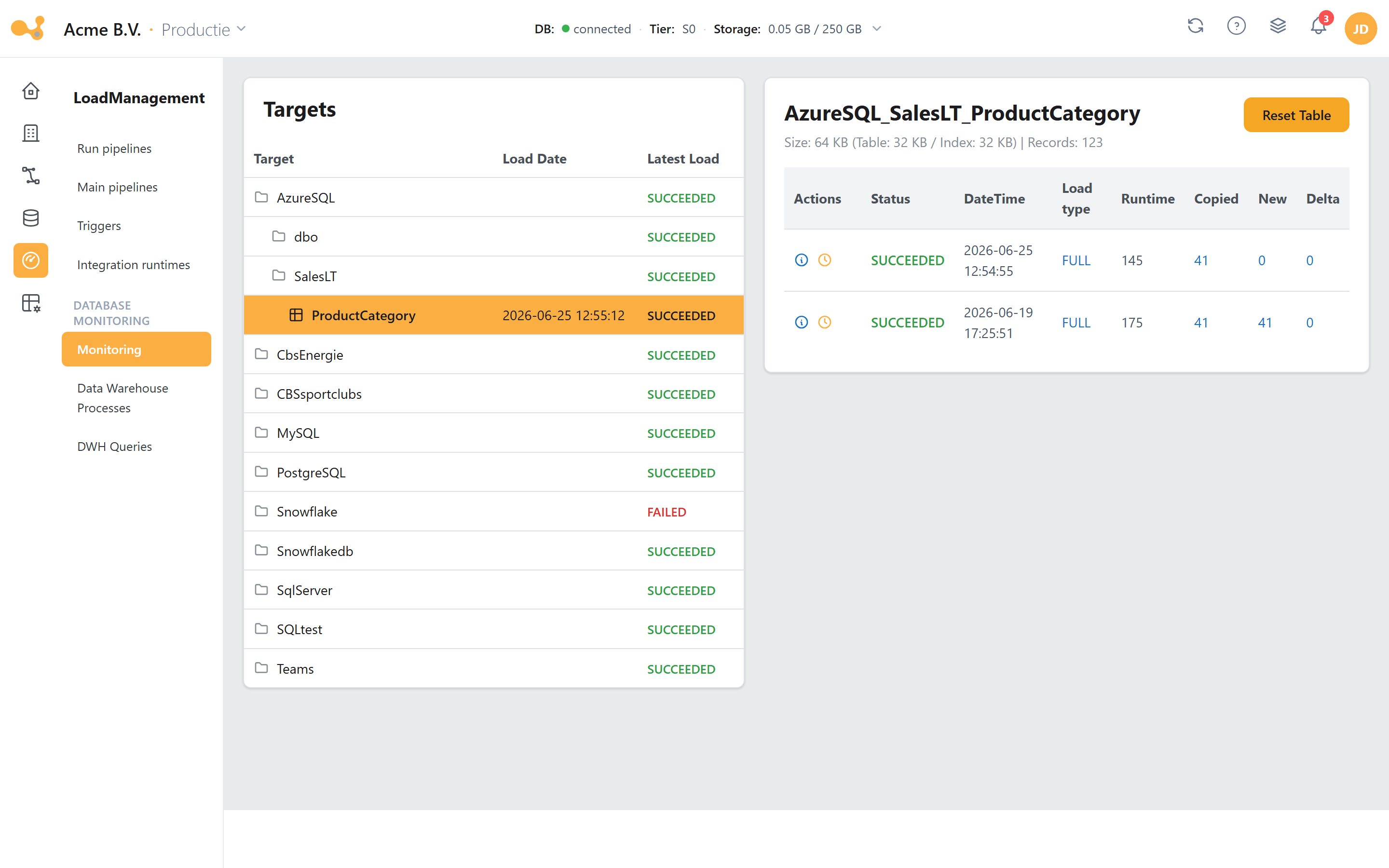
Het Monitoring-scherm leest vwLoads/vwMonitor: selecteer links een target en bekijk rechts de runs en hun stappen.
(1) Targets-boom (Source / Schema / Table) met per tabel de laatste laaddatum en een status-rollup; de tooltip toont "Failed: x | Running: y | Succeeded: z".
(2) Target-header met de geselecteerde tabel plus een Size / Records-regel.
(3) Reset table — leegt de tabel na een bevestiging.
(4) Runs-grid met Status, DateTime, Load type, Runtime, Copied, New, Delta (uit vwLoads/vwMonitor).
(5) Stappen-modal — opent per run de losse LS_Trans-stappen (rood bij FAILED) plus een directe ADF-link.
[Monitoring].[vwLoads]
Doel: de canonieke per-pipeline load-timeline. Pivoteert LS_Trans (Process='load') over de
stappenset [Start load], [Start truncate table], [lookup mapping], [Start load data],
[Start upsert HIS], [Start update ETL_EndDate], [Start update count rows], [End load] en berekent
per stap het starttijdstip plus de runtime (DATEDIFF(SECOND, …)). Joint de row-count-pivots
(Deleted/Delta/New/Copied rows), een status-subselect, de workflow-status, de LatestLoad-vlag, de
Environment (fxGetSetting('EnvironmentName')) en ADF-deeplinks via Loadmanagement.fxGenerateAdfUrl(...).
Tijden worden door dbo.fxUTC2CET omgezet.
Belangrijke kolommen: o.a. [LatestRecord] en [LatestLoad], plus per stap een starttijd en
[Runtime sec: …], de row-counts en [Status].
[Monitoring].[vwMonitor]
Doel: een bredere monitor dan vwLoads. Draait op LoadManagement.LoadLog (niet alleen op
LS_Trans), left-joint de stap-/row-pivots en DeletedLoads, en UNIONt twee extra bronnen:
Materialized Views-loads en PowerBI Models-refreshes (Process IN ('Materialize Views','Refresh_PBI')).
Dit is de view waar fxGetTableLoads en Monitoring.vwUsedTables op verder bouwen.
Output-kolommen: [Workflow ID], [Pipeline ID], [Pipeline name], [Source system], [Target],
[DateTime], [Started by], [LoadType], [ETL Date], [Start load], [Start load data],
[Runtime sec: load data], [Start upsert HIS], [Runtime sec: upsert HIS], [Start update ETL_EndDate],
[Runtime sec: update ETL_EndDate], [End load], [Runtime sec: Pipeline], [Copied rows], [New rows],
[Delta rows], [Deleted rows], [Status], [LatestLoad], [Deleted], [Deleted by], [Deleted on],
[WorkflowAdfUrl], [PipelineAdfUrl].
[Monitoring].[vwWorkflow]
Doel: de timeline op workflow-niveau (niet pipeline-niveau). Pivoteert LS_Trans
(Process='Workflow') over [Start workflow], [Start Get Tables], [Get Tables],
[Start ForEach Table], [ForEach Table], [End Workflow], joint LS_Pipeline (met LatestRecord,
CopiedRows, ETLDate), een laatste-status-subselect en een LatestLoad-vlag. Filtert
WHERE [WorkflowID] IS NOT NULL.
[Monitoring].[vwUsedTables]
Doel: per used-table de laatste load plus status. UNIONt LoadManagement.vwUsedTables met
CustomYres.Extractor en filtert op vwMonitor.LatestLoad='yes'.
Output-kolommen: Source, SourceSchema, SourceTable, LoadType, LatestLoad (= vwMonitor.[ETL Date],
een datum), LatestStatus (= vwMonitor.status).
Gebruikers-, toegangs- en object-audit views (uit EventLog)
[Monitoring].[vwAccessManagement]
Shredt EventLog.fullCommand (XML) tot één rij per Grantee × Permission voor GRANT_*/DENY_*/REVOKE_*-events.
Kolommen: Type, Permission, ObjectType, ServerName, DatabaseName, SchemaName, ObjectName,
Grantee, script, ChangedOn DATETIME2, ChangedBy.
[Monitoring].[vwUserManagement]
Gebruikers- en rol-levensloopgebeurtenissen (WHERE ObjectType LIKE '% USER' OR ObjectType='ROLE').
Kolommen: Type, ObjectType, ServerName, DatabaseName, dbUser, RoleName, script,
ChangedOn, ChangedBy.
[Monitoring].[vwObjectAlterations]
DDL-wijzigingen door echte gebruikers, exclusief permissie- en user-events
(ChangedBy NOT IN ('ADF','Unknown')).
Kolommen: EventType, ObjectType, ServerName, DatabaseName, SchemaName, ObjectName, script,
ChangedOn, ChangedBy.
Procedure-log views (uit Config.ProcessLog)
[Config].[vwUserlog]
Een leesbare weergave van ProcessLog.
Kolommen: ProcessID, Date, Time, timestamp, UserId, User (gesplitst uit appUser op |),
Process (= spName), [Process step] (= spStep), returnCode, MessageType
(0 = Information, 4 = Warning, 8 = Error, 12 = System Error, 16 = Dump, anders UNKNOWN),
Message (CONCAT_WS van message1–message4 + errorMessage), dbRequest (= spCall).
[Config].[vwUserLogJSON]
Een per-proces JSON-geaggregeerde view, bedoeld voor de webapp.
Kolommen: process, returnCode (MAX), messageType, timestamp, dbRequest, user, userId,
processID (bewaard als nvarchar(36) — "DO NOT REMOVE!! USED IN WEBAPP"), Steps
(geneste FOR JSON PATH van stap → berichten).
Engine-views (referentie)
Naast de monitoring-views gebruikt de laadmotor zelf een aantal views. De belangrijkste:
[LoadManagement].[vwExtractor]
SELECT * FROM [LoadManagement].[fxExtractor](NULL,NULL) — een dunne wrapper die fxExtractor met beide
parameters NULL blootstelt. De output-kolommen zijn dus gelijk aan die van fxExtractor (zie
Functions). ADF leest deze view om te leren welke tabellen geladen moeten worden.
[LoadManagement].[vwDictionary]
De kolom-niveau metadata-join die overal in de engine gebruikt wordt.
Kolommen: RowId, Source, SourceSchema, SourceTable, SourceColumn, SourceDataType,
TargetDataType, NullAble, KeyColumn, RowHashColumn, FactColumn, Position,
LoadType (default 'FULL'), deltaColumn, TargetSource, TargetSchema, TargetTable,
ActualTableName, ActualStageSchema, ActualHisSchema, keepStage.
Staging-tabellen Dictionary_Stage / Services_Stage
De metadata-refresh (GetMetaData - <bron>) vult sinds juni 2026 niet meer rechtstreeks de live
Dictionary/Config.Services, maar eerst twee stagingtabellen met dezelfde kolommen:
[LoadManagement].[Dictionary_Stage] en [Config].[Services_Stage]. Een atomische swap promoveert
stage → live; bij 0 gestagede rijen blijft de live-metadata staan. Het mechanisme en de bijbehorende
procedures (spSwapDictionary, spClearDictionaryStage, spFinalizeDictionary en hun Services-varianten)
staan beschreven bij Stored procedures → Metadata-staging.
[<HIS-schema>].[<Target>_IncArchive] — gegenereerde archiefviews (v1.56)
Per gearchiveerde tabel onderhoudt spArchiveMaintainView een union-view die de live tabel én de
gearchiveerde Parquet-bestanden in de Data Lake als één geheel toont (UNION ALL via data
virtualization/OPENROWSET, gededupliceerd op de RowID met voorrang voor de live rij). De kolomlijst
wordt bij elke archiveringsrun opnieuw uit de live tabel gegenereerd. Zie
Archivering.
vwArchivingExtractorDe oude view [LoadManagement].[vwArchivingExtractor] (settings-gestuurde standaard-archivering) is in
v1.56 verwijderd; het ArchivingScript op vwExtractor — nu gevoed door fxArchivingPredicate — is het
enige archiveringscontract.
Overige LoadManagement-views
| View | Doel |
|---|---|
[LoadManagement].[vwUsedTables] | Alle used tables met metadata, row-counts in DWH en STAGE, laatste-load-detail en change- id's. Bevat o.a. LatestRecord, [LatestLoad], [Rows in DWH], [Rows in Staging], en de change-id ChangeId (= laatste open change). |
[LoadManagement].[vwUnusedTables] | Tabellen die in de Dictionary staan maar niet actief gebruikt worden (Source, SourceSchema, SourceTable). |
[LoadManagement].[vwUsedColumns] | Actief gebruikte kolommen (Source, SourceSchema, SourceTable, SourceColumn). |
[LoadManagement].[vwUsedODSTablesAndColumns] | JSON-weergave van ODS-tabellen en hun kolommen incl. target-datatypes (ODS_Schema, Source, SourceSchema, SourceTable, Columns). |
[LoadManagement].[vwViewPersistence] | Informatie over view-persistentie: bron-/doeldetails, delta-kolommen en laatste persist-datums. |
[LoadManagement].[vwViewsAndColumns] | JSON-weergave van views en hun kolommen (TABLE_SCHEMA, TABLE_NAME, Columns). |
Config-vergelijkingsviews
| View | Doel |
|---|---|
[Config].[vwDictionaryVsHis] | Vergelijkt dictionary-definities met de HIS-tabellen: MissingColumns, TypeMismatch, DeletedColumns. |
[Config].[vwDictionaryVsStage] | Vergelijkt dictionary-definities met de STAGE-tabellen: MissingColumns, TypeMismatch, DeletedColumns. |
Voor één tabel: SELECT * FROM [Monitoring].[vwLoads] WHERE [Target] = '…' ORDER BY [Start load] DESC.
Voor het bredere beeld (incl. gematerialiseerde views en Power BI-refreshes): [Monitoring].[vwMonitor].
Voor de losse stappen van één run: filter [Monitoring].[LS_Trans] op de betreffende PipelineID.